by iamrolanddiaz | Apr 9, 2026 | Principeng Hari
Google has officially confirmed that its March 2026 Core Update has completed its rollout—marking another significant recalibration of search rankings across the global digital ecosystem.
Launched on March 27, 2026, and finalized on April 8, 2026, this update took approximately 12 days to fully deploy, aligning with Google’s expected rollout window and signaling a faster iteration compared to previous updates.
But beyond the timeline, the real question for businesses, marketers, and SEO leaders is this:
What actually changed—and what should you do next?
A “Regular” Core Update—But With Strategic Implications
Google described the March 2026 update as a “regular core update”, designed to improve how content is evaluated and surfaced in search results.
No major announcement. No detailed blog. No explicit ranking factors revealed.
However, this silence is strategic.
Core updates are never about a single ranking signal—they represent system-wide recalibration. Google is refining how it interprets:
- Content relevance
- User satisfaction signals
- Authority and trustworthiness
- Content depth and originality
In short, this isn’t just an update—it’s a quality reset across the web.
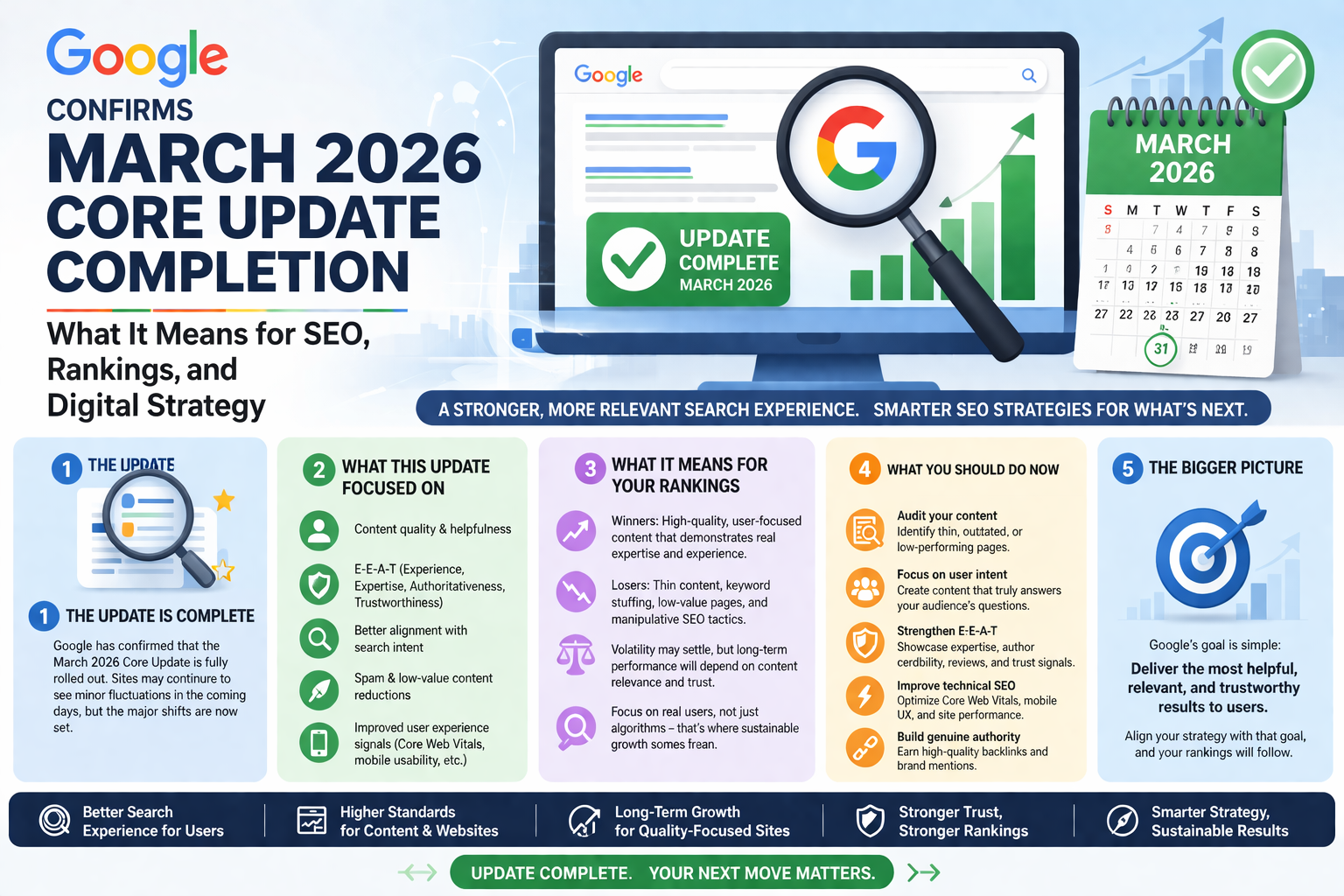
Visual outline of search system updates and ranking context.
March 2026: A High-Intensity Algorithm Month
March wasn’t just active—it was strategically aggressive in terms of Google’s ranking evolution.
Within just five weeks, three major updates occurred:
1. February 2026 Discover Core Update
- Completed: February 27
- Duration: 22 days
- Focus: Google Discover content ecosystem
2. March 2026 Spam Update
- Completed: March 25
- Duration: Less than 20 hours
- Fastest spam update recorded
3. March 2026 Core Update
- Started: March 27
- Completed: April 8
- Duration: 12 days
This sequence is not random.
Think of it as Google cleaning the foundation before rebuilding the structure.
The spam update likely removed low-quality or manipulative signals, allowing the core update to re-evaluate ranking quality with a cleaner dataset.
How This Core Update Compares
Here’s how the March 2026 rollout stacks up against recent updates:
- March 2026: 12 days
- December 2025: 18 days
- June 2025: 17 days
- March 2025: 14 days
- December 2024: 6 days
This makes it the second-fastest core update in recent cycles, suggesting increased efficiency in Google’s deployment systems.
What This Means for Your Website Performance
Now that the rollout is complete, data analysis becomes critical.
When to Check Your Data
Google recommends waiting at least one full week post-rollout before making conclusions. This allows rankings and user behavior to stabilize.
What to Compare
- Pre-update baseline: Before March 27
- Post-update performance: After April 8
Be cautious:
Ranking fluctuations between March 24–27 may be influenced by the spam update, not just the core update.
Ranking Drops Don’t Mean Penalties
One of the biggest misconceptions in SEO is assuming that ranking drops equal penalties.
That’s not how core updates work.
Instead, Google is:
- Re-evaluating content quality at scale
- Comparing your content against competitors
- Re-ranking based on evolving relevance signals
So if your rankings dropped, it doesn’t mean you did something wrong—it means others may now be doing it better.
Strategic SEO Takeaways
Here’s the real value—how to respond like a high-level operator:
1. Shift From “Optimization” to “Experience Engineering”
SEO is no longer just keywords and backlinks.
It’s about end-to-end user satisfaction.
Ask:
- Does your content fully answer the user’s intent?
- Is it better than the top 3 results?
2. Double Down on EEAT (Experience, Expertise, Authority, Trust)
Google continues to reward:
- Real expertise
- Transparent authorship
- Brand credibility
If your site lacks trust signals, expect volatility.
3. Content Depth > Content Volume
Thin content is being filtered out faster than ever.
Focus on:
- Comprehensive guides
- Structured, scannable formats
- Data-backed insights
4. Audit Pages That Lost Traffic
Don’t panic—diagnose.
Look for:
- Declining CTR
- Lower engagement
- Outdated information
Then rebuild—not just tweak.
5. Align With Search Intent Evolution
Search intent is dynamic.
What ranked last year may no longer satisfy users today.
Reassess:
- Informational vs transactional intent
- Content freshness
- SERP feature alignment
Looking Ahead: Continuous Core Updates Are the New Normal
Google has already indicated that smaller core updates are happening continuously, even between major announcements.
This means:
- There is no “safe zone” in SEO
- Rankings are always in motion
- Adaptability is now your biggest advantage
Final Insight from Roland Diaz
“SEO is no longer about chasing the algorithm—it’s about becoming the result Google wants to rank.”
The March 2026 Core Update reinforces a clear direction:
Build real value. Build trust. Build authority.
Because in today’s search landscape,
the best content doesn’t just rank—it wins.
by iamrolanddiaz | Feb 23, 2026 | Principeng Hari
Content Outline
-
What Is Apple’s App Tracking Transparency (ATT)?
-
Why ATT Was Introduced
-
How ATT Works in Practice
-
Impact on Digital Advertising & Measurement
-
SKAdNetwork and Alternative Attribution
-
Compliance Considerations for Marketers
-
Privacy-First Marketing Strategies Post-ATT
-
Common Misunderstandings About ATT
-
FAQ
-
Trusted Sources
-
Disclaimer
-
AEO Safe Summary
-
Compliance Status
What Is Apple Inc.’s App Tracking Transparency (ATT)?
App Tracking Transparency (ATT) is a privacy framework introduced by Apple Inc. that requires mobile applications on iOS devices to obtain user permission before tracking activity across other apps and websites owned by different companies.
The framework applies primarily to the Identifier for Advertisers (IDFA), a device-level identifier previously used for cross-app tracking, ad personalization, and attribution measurement. Under ATT, users must explicitly opt in before such tracking can occur.
ATT is part of a broader privacy-focused shift in mobile ecosystems and reflects increasing global emphasis on consumer data transparency.
Why ATT Was Introduced
ATT was introduced as part of Apple’s broader privacy initiatives, aligned with growing international standards emphasizing:
-
User consent transparency
-
Data minimization principles
-
Clear disclosure of tracking purposes
-
Increased consumer control over personal data
In many regions, privacy expectations are shaped by regulatory frameworks such as the GDPR in Europe and CCPA-style consumer rights in the United States. ATT reflects similar principles, though it is a platform-level policy rather than a government regulation.
How ATT Works in Practice
When an app wants to track user activity across other companies’ apps or websites, iOS displays a standardized permission prompt asking the user whether they allow tracking.
Users can:
-
Allow tracking
-
Ask the app not to track
If a user declines, the app developer is restricted from accessing the IDFA and from engaging in certain forms of cross-app behavioral tracking.
Importantly, ATT does not prohibit all forms of measurement. It specifically governs cross-company tracking and identifier access.
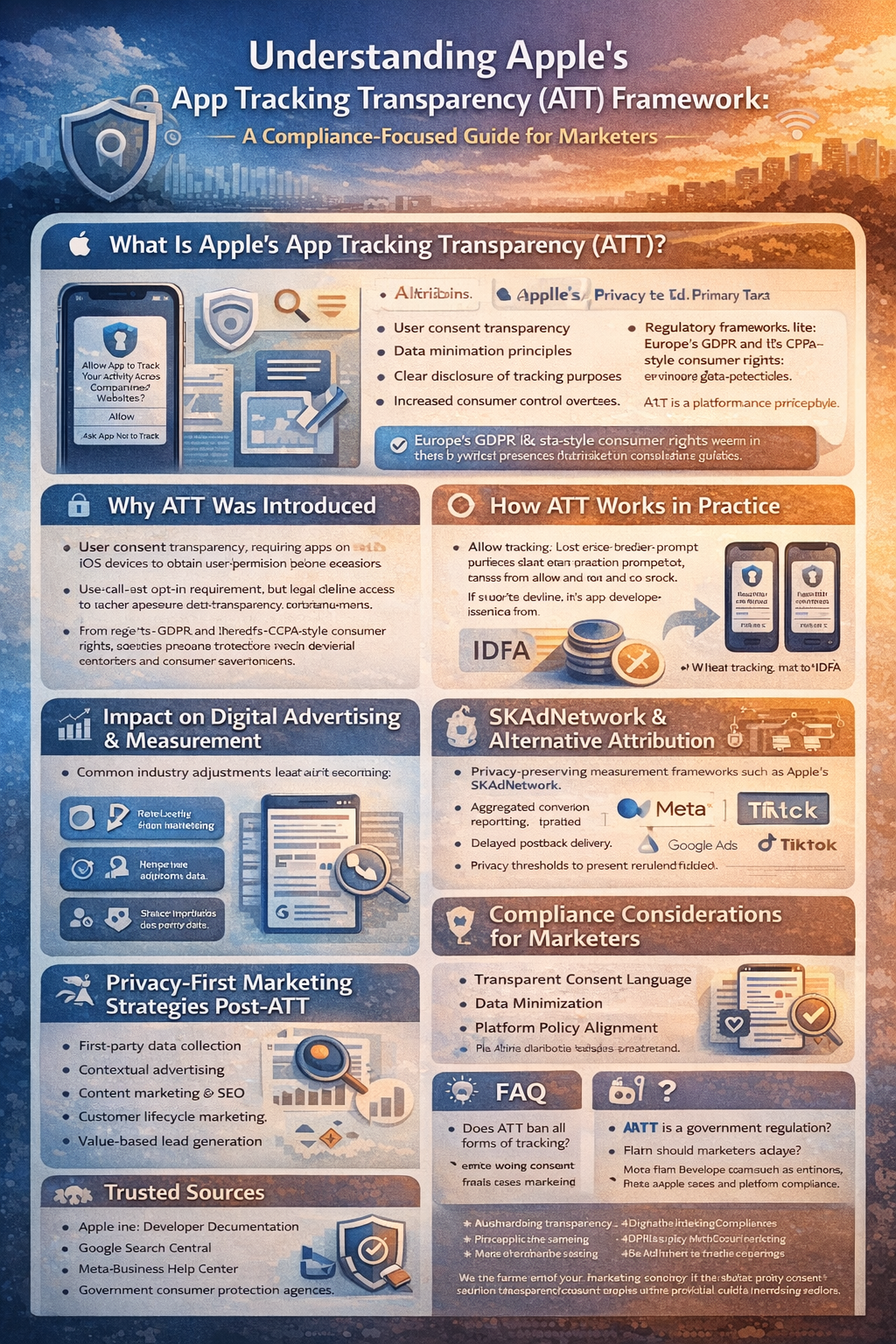
Structured infographic presenting sections related to mobile privacy permissions and aggregated attribution environments.
Impact on Digital Advertising & Measurement
ATT significantly changed how mobile advertising campaigns are measured and optimized.
Common industry adjustments include:
-
Reduced availability of device-level attribution data
-
Increased reliance on aggregated reporting
-
Shortened attribution windows in many cases
-
Greater emphasis on first-party data strategies
Results vary depending on region, industry, audience behavior, and campaign structure. Performance outcomes depend heavily on implementation quality and platform compliance.
SKAdNetwork and Alternative Attribution
To support privacy-preserving measurement, Apple introduced SKAdNetwork, an attribution framework designed to provide aggregated campaign performance data without revealing user-level information.
Key characteristics of SKAdNetwork:
-
Aggregated conversion reporting
-
Limited granularity
-
Delayed postback delivery
-
Privacy thresholds to prevent re-identification
Marketers often combine SKAdNetwork reporting with:
-
First-party analytics
-
Contextual targeting strategies
-
Modeled attribution approaches
-
Platform-native analytics tools
Measurement methodologies continue evolving as privacy standards and platform rules change.
Compliance Considerations for Marketers
When operating in environments affected by ATT, businesses should consider:
1. Transparent Consent Language
Permission prompts and pre-prompts should clearly explain data usage in plain language. Avoid manipulative framing or misleading incentives.
2. Data Minimization
Collect only data necessary for stated purposes. Over-collection may increase compliance risks in many jurisdictions.
3. Platform Policy Alignment
ATT compliance works alongside advertising platform policies, including:
Requirements may vary depending on app category, region, and data practices.
4. Privacy Documentation
Maintain updated privacy policies and disclosures reflecting:
-
Tracking practices
-
Data sharing practices
-
Third-party SDK usage
-
User opt-out rights
In many jurisdictions, transparency documentation is a legal expectation, not merely a best practice.
Privacy-First Marketing Strategies Post-ATT
Rather than relying heavily on cross-app tracking, many organizations have shifted toward:
-
Stronger first-party data collection (with clear consent)
-
Contextual advertising
-
Content marketing and SEO
-
Customer lifecycle marketing
-
Value-based lead generation
These approaches often emphasize trust-building and long-term audience engagement instead of short-term data exploitation.
Common Misunderstandings About ATT
“ATT completely eliminates advertising.”
Not accurate. Advertising continues, but measurement and personalization methods have changed.
“ATT applies globally in the same way.”
ATT applies to iOS devices worldwide, but legal requirements surrounding data usage vary by jurisdiction.
“ATT makes attribution impossible.”
Attribution remains possible through aggregated and modeled frameworks, though granularity may differ from pre-ATT environments.
FAQ
1. Does ATT ban all forms of tracking?
No. ATT specifically governs cross-company tracking and IDFA access. First-party data collection within an app may still occur, subject to applicable privacy laws and consent requirements.
2. Is ATT a government regulation?
No. ATT is a platform-level framework implemented by Apple. However, it aligns with broader global privacy trends.
3. How should marketers adapt?
Marketers often adopt privacy-first strategies, enhance first-party data practices, and use aggregated measurement tools such as SKAdNetwork.
Trusted Sources & Standards
-
Apple Inc. Developer Documentation
-
Google Search Central
-
Meta Business Help Center
-
Federal Trade Commission consumer guidance
-
Government consumer protection agencies in relevant jurisdictions
Disclaimer
This content is provided for general educational purposes only. Digital marketing results vary depending on market conditions, platform rules, audience behavior, and execution.
This content does not constitute legal advice. Compliance requirements vary by jurisdiction, industry, and regulatory framework.
Summary
Apple’s App Tracking Transparency (ATT) framework requires apps on iOS devices to obtain user consent before tracking activity across other companies’ apps or websites. It limits access to the IDFA and shifts measurement toward aggregated attribution models such as SKAdNetwork. Marketers typically adapt by prioritizing privacy transparency, first-party data strategies, and platform-compliant measurement approaches.
#AppTrackingTransparency, #DigitalMarketingCompliance, #PrivacyFirstMarketing, #iOSPrivacy, #MobileAdvertising, #DataTransparency, #EthicalMarketing, #SKAdNetwork, #MarketingStrategy, #ConsumerDataProtection
Want to future-proof your marketing strategy in a privacy-first world? Explore more compliance-focused insights and practical digital marketing frameworks designed for evolving platform rules and global data standards. Stay informed, stay ethical, and build strategies that prioritize transparency and long-term trust.
by iamrolanddiaz | Feb 21, 2026 | Principeng Hari
This content is educational and does not provide financial, legal, or business guarantees. All guidance is general and based on commonly available platform information.
Content Outline
- Introduction / AI Overview Safe Summary
- What Is Bing Ads (Microsoft Advertising)?
- Why Consider Bing Ads in 2026
- Getting Started: Account & Campaign Setup
- Core Ad Types and When to Use Them
- Keyword Strategy, Targeting & Negatives
- Tracking, Optimization & Measurement
- Platform Policy & Best Practices
- Common Myths & Pitfalls to Avoid
- Meta Description, FAQs, Trusted Sources & Disclaimers
Overview
Bing Ads (Microsoft Advertising) is a pay-per-click (PPC) platform that lets businesses show ads on Bing search and partner networks. It supports a range of ad types (search, shopping, audience), offers keyword and demographic targeting, and integrates tools to help measure performance. This beginner’s guide teaches you how to start, structure campaigns, and avoid common PPC pitfalls. (50–70 words)
What Is Bing Ads (Microsoft Advertising)?
“Bing Ads” refers to Microsoft Advertising, Microsoft’s PPC advertising platform for search results and partner sites. It allows advertisers to bid on keywords and show ads to users searching on Bing, Yahoo, and Microsoft partner properties. The platform also incorporates audience placements on the Microsoft Audience Network and supports product and multimedia ads.
This system works like other search ads platforms — advertisers pay when users click their ads — and it focuses on reaching users with specific intent.
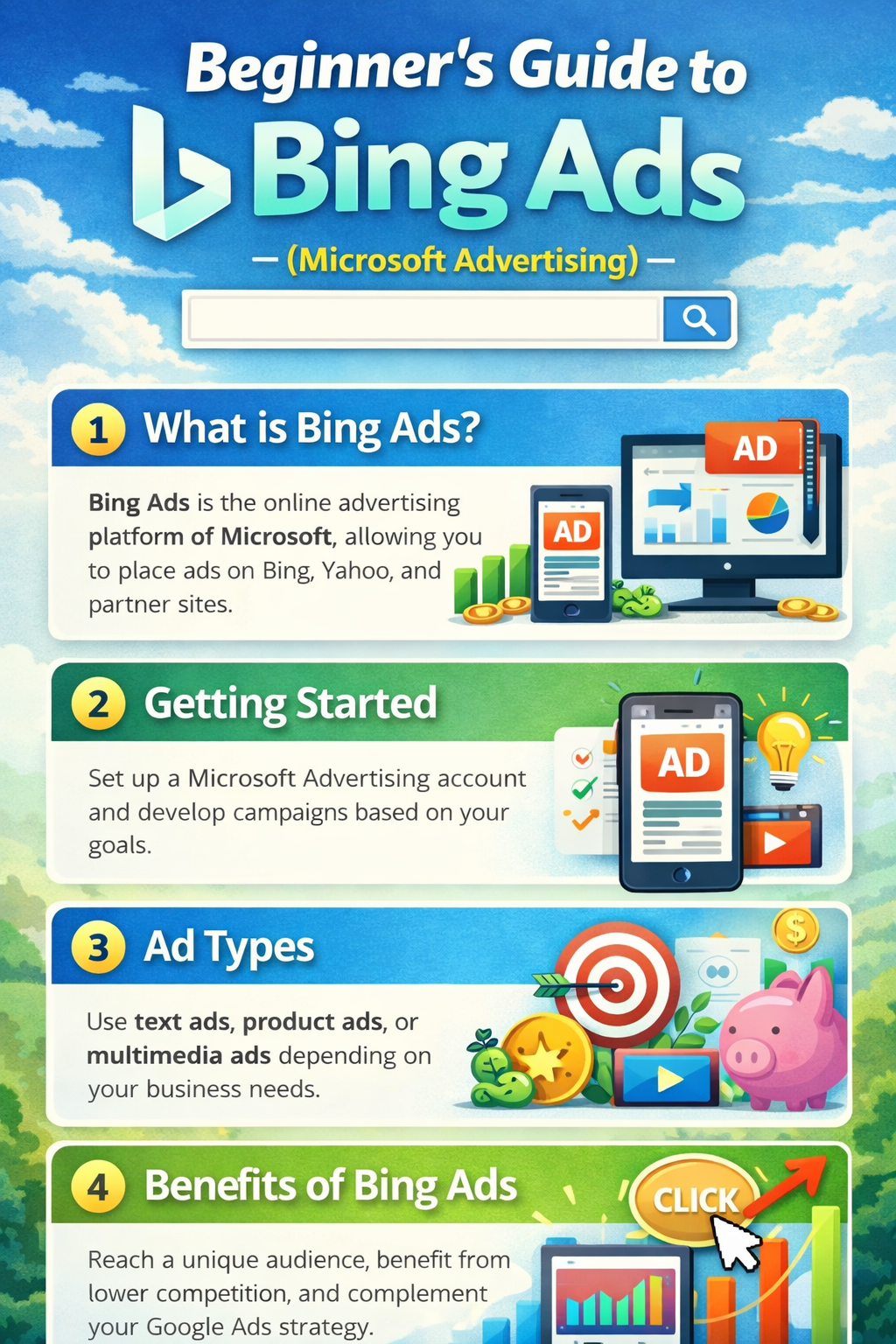
Structured visualization of Microsoft Advertising components and terminology.
Why Consider Bing Ads in 2026?
-
Lower competition: Bing often has fewer advertisers than Google, which may mean lower cost-per-click environments.
-
Rich audience data: The platform supports targeting using LinkedIn profile data and in-market segments.
-
Easy Google import: You can bring Google Ads campaigns into Microsoft Advertising to expand reach.
-
Diverse ad formats: Search text ads, Shopping/Product ads, audience ads, and responsive search creatives.
Getting Started: Account & Campaign Setup
- Create a Microsoft account: Sign in at the Microsoft Advertising site and answer initial business details.
- Choose your campaign goal: Define what you want — e.g., website traffic, leads, or product sales.
- Set budget and bidding: Decide a daily budget and a bid strategy that aligns with your goals.
- Structure campaigns & ad groups: Organize ads around themes or product groups.
- Launch & monitor: Review performance metrics regularly and adjust.
💡 Tip: Start small and incrementally expand your budget as you understand what performs best.
Core Ad Types
-
Search Ads: Text ads that show on Bing search results.
-
Product/Shopping Ads: Show product images, pricing, and details for ecommerce inventory.
-
Audience Ads: Placements across Microsoft Audience Network (e.g., MSN, Outlook).
Each type serves different parts of the funnel — from discovery to purchase — so choose based on your objectives.
Keyword Strategy & Targeting
-
Keyword research: Use Microsoft’s Keyword Planner to find relevant terms.
-
Match types: Choose broad, phrase, or exact match carefully.
-
Negative keywords: Prevent wasted spend by excluding irrelevant terms.
Organized ad groups with tightly related keywords help improve relevance and quality measures.
Tracking & Optimization Best Practices
-
Conversion tracking: Use UET (Universal Event Tracking) to monitor actions like form fills or purchases.
-
Regular review: Weekly or biweekly, check search terms, bids, and audience performance.
-
Ad refresh: Rotate headlines or descriptions to maintain relevance.
Data-driven adjustments often support better efficiency than one-off changes.
Platform Policies & Best Practices
Microsoft Advertising has content and targeting policies to keep ads safe and compliant. Ensure:
-
Accurate business info and billing details
-
No deceptive or prohibited content
-
Measurement tags implemented with user consent and privacy disclosures
Always check region-specific ad policies inside the Microsoft Advertising portal.
Common Myths & Pitfalls
-
“Lower CPC guaranteed”: Click costs vary widely by industry and keyword.
-
Import = optimization: Imported Google campaigns often need refinements.
-
Easy traffic = conversions: Cheap clicks are not always high quality — test and measure carefully.
Meta Description
Beginner’s guide to Bing Ads (Microsoft Advertising) in 2026: setup, ad types, keyword strategy, tracking basics, and compliance-safe best practices for search marketing.
FAQ
Q1: Is Bing Ads still relevant in 2026?
A: Yes. Microsoft Advertising continues to support search and audience campaigns across Bing and partner properties.
Q2: Can I reuse Google Ads campaigns?
A: You can import them, but it’s often beneficial to tailor them to Microsoft’s audience profiles.
Q3: What’s UET tracking?
A: UET (Universal Event Tracking) helps measure conversions and user actions from your ads.
Trusted Sources & Standards
-
Microsoft Advertising official support and documentation (general platform guidelines)
-
PPC industry best practices for search advertising
-
SEO & digital marketing educational resources
Disclaimer
This content is provided for general educational purposes only. Advertising results vary by platform rules, audience behavior, business context, and execution. This content does not constitute legal, financial, or business advice.

by iamrolanddiaz | Feb 21, 2026 | Principeng Hari
What Is Meta Pixel?
Meta Pixel is a browser-based tracking tool provided through Meta Platforms advertising ecosystem. It allows website owners to measure user actions after interacting with ads on platforms such as Facebook and Instagram.
In practical terms, it helps advertisers understand whether users completed actions like purchases, sign-ups, or page views after seeing or clicking an ad. Results vary depending on implementation, audience behavior, and platform attribution models.
How Meta Pixel Works in 2026
In 2026, Meta Pixel operates within a more privacy-focused digital advertising environment. Many regions require transparent data disclosure, user consent mechanisms, and clear opt-out options.
Meta Pixel typically works by:
- Placing a small JavaScript snippet on your website
- Recording predefined or custom user events
- Sending event data to Meta’s advertising system
- Using aggregated data for reporting and campaign optimization
Due to browser restrictions and privacy updates, many advertisers also explore server-side tracking options such as Conversions API to support more stable measurement. Implementation approaches may vary depending on regional regulations and platform requirements.
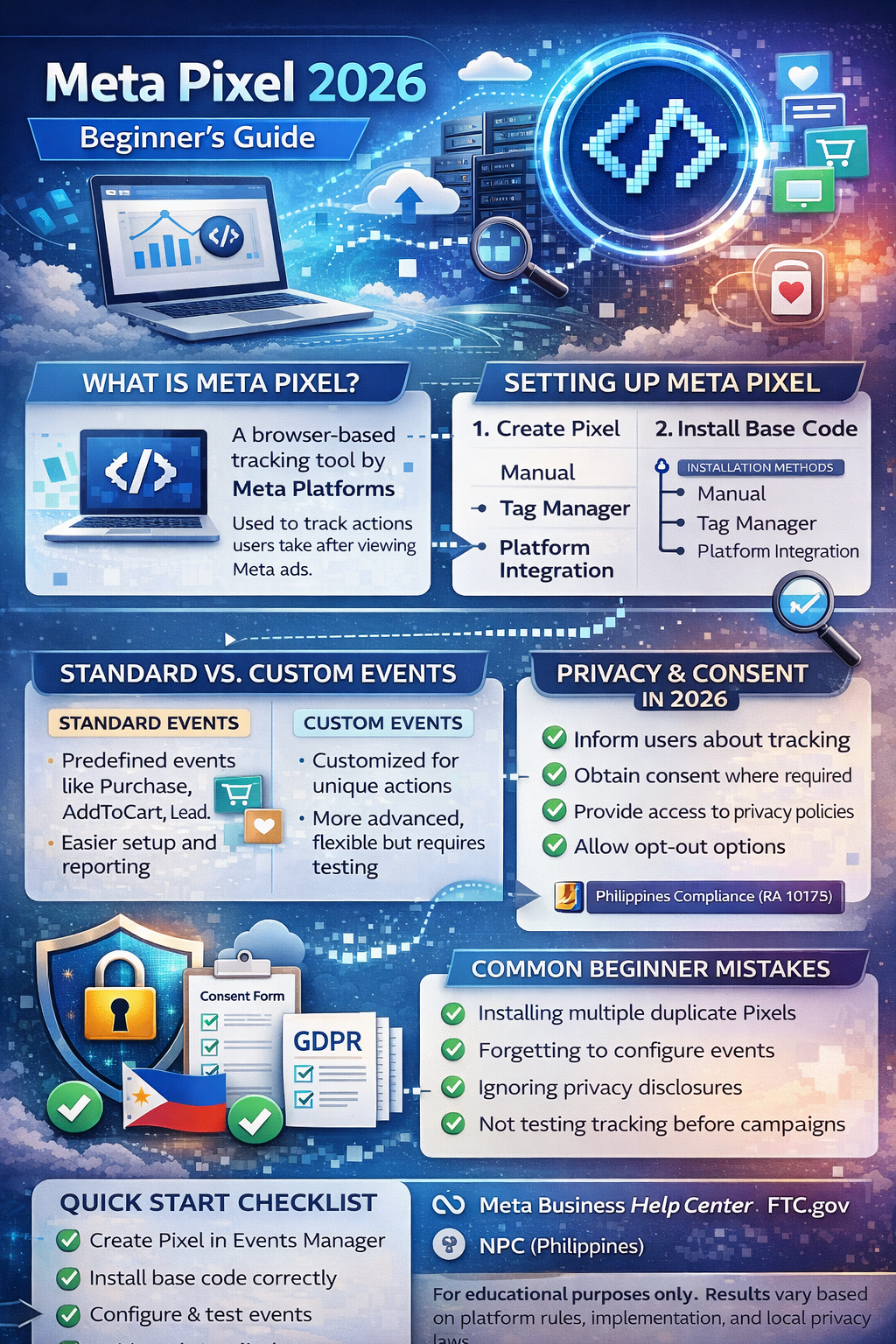
Structured overview of Meta Pixel components and digital measurement framework.
How to Install Meta Pixel (Beginner Steps)
The general setup process often includes:
- Creating a Pixel inside Meta Events Manager
- Copying the base code
- Installing it via:
- Manual website header insertion
- Tag management systems
- E-commerce platform integrations
- Verifying installation using Meta’s testing tools
Some website builders offer built-in integration options. Always review platform documentation before deployment.
Understanding Standard Events
Standard events are predefined actions recognized by Meta’s system. Examples commonly include:
-
PageView
-
ViewContent
-
AddToCart
-
InitiateCheckout
-
Purchase
-
Lead
-
CompleteRegistration
Using standardized naming improves reporting consistency and campaign optimization. However, outcomes depend on accurate implementation and audience relevance.
Custom Events vs Standard Events
Standard Events
Custom Events
-
Used for unique website interactions
-
Require manual configuration
-
Offer flexibility but may require more testing
Choosing between them depends on business goals and technical capability.
Privacy & Consent Considerations in 2026
Data transparency is increasingly important across many jurisdictions. In many regions, websites using tracking tools must:
-
Inform users about tracking technologies
-
Obtain consent where required
-
Provide access to privacy policies
-
Allow opt-out or preference management
Frameworks such as GDPR-style and CCPA-style regulations emphasize user rights and data minimization. Businesses operating in the Philippines should also consider the Data Privacy Act (RA 10173).
It is generally recommended to integrate Meta Pixel with a consent management system to align with platform and regional expectations.
Common Beginner Mistakes
- Installing multiple duplicate Pixels
- Forgetting to configure events properly
- Not testing events before launching ads
- Ignoring privacy disclosures
- Relying solely on pixel data without cross-checking analytics
Careful setup and regular audits can help improve reporting accuracy.
Practical Implementation Checklist
✔ Create Pixel in Events Manager
✔ Install base code correctly
✔ Configure standard events
✔ Test using Meta diagnostics tools
✔ Connect to ad account
✔ Review privacy policy disclosures
✔ Implement consent management (if required)
✔ Monitor event matching quality
FAQ
1. Is Meta Pixel still relevant in 2026?
Meta Pixel remains commonly used for ad performance measurement, although many advertisers supplement it with server-side solutions to adapt to evolving privacy environments.
2. Does Meta Pixel track users without consent?
Consent requirements depend on local regulations. In many regions, websites are expected to disclose tracking technologies and obtain user permission where legally required.
3. Can beginners install Meta Pixel without coding?
Many website platforms provide integration tools that reduce the need for manual coding, though technical validation is still recommended.
Trusted Sources / Standards
-
Meta Business Help Center
-
Meta Events Manager
-
Google Search Central
-
Federal Trade Commission (FTC) consumer advertising guidance
-
National Privacy Commission (Philippines)
Disclaimer
This content is provided for general educational purposes only. Digital marketing results vary depending on market conditions, platform rules, audience behavior, technical implementation, and execution.
Summary
Meta Pixel is a website tracking tool used to measure ad-related actions such as purchases and sign-ups. In 2026, proper installation, event configuration, and privacy compliance are essential. Businesses should implement transparent consent practices and follow platform documentation to ensure accurate measurement and responsible data handling.

by iamrolanddiaz | Feb 20, 2026 | Principeng Hari
A neutral overview of certification categories and examples that align with evolving workforce needs.
This article provides an informational overview of professional certifications that are widely discussed in workforce development research and industry competency frameworks. It highlights certification areas associated with skill development, emerging labor market relevance, and internationally recognized standardization bodies. Content is presented without guarantees of employment or income outcomes.
Information Technology and Cybersecurity
Examples
-
Cloud certifications from major cloud providers (e.g., foundational and associate levels)
-
Cybersecurity fundamentals and specialized pathways
-
IT service management frameworks
Context:
Cloud computing and cybersecurity skills continue to be part of global digital infrastructure trends noted in workforce studies. Industry certification programs in these domains often reflect vendor technologies or widely referenced frameworks. Certifications in this category typically aim to demonstrate understanding of specific technical domains and standardized practices.
Data and Analytics
Examples
-
Data analysis and visualization certifications
-
Data management and governance credentials
-
Foundations of machine learning and AI literacy programs
Context:
Professionals in fields that interact with large data sets may pursue structured credentialing to align with standardized knowledge bases. These programs are often framed around core competencies rather than employment guarantees.
Project and Business Management
Examples
-
Framework-based project management certifications
-
Business analysis credentials
-
Agile and iterative methodologies
Context:
Standardized project and business management frameworks are referenced in organizational productivity and process optimization guidelines. Many certifications in this space align with widely adopted frameworks and aim to signal structured understanding of methodologies.
Digital Marketing and E-Commerce
Examples
-
Search marketing and digital strategy principles
-
Analytics tracking and measurement credentials
-
E-commerce operations foundations
Context:
Digital strategy and analytics are core components of many organizational outreach and commerce activities. Credentialing programs exist to support structured learning in these areas and may align with industry-accepted knowledge domains.
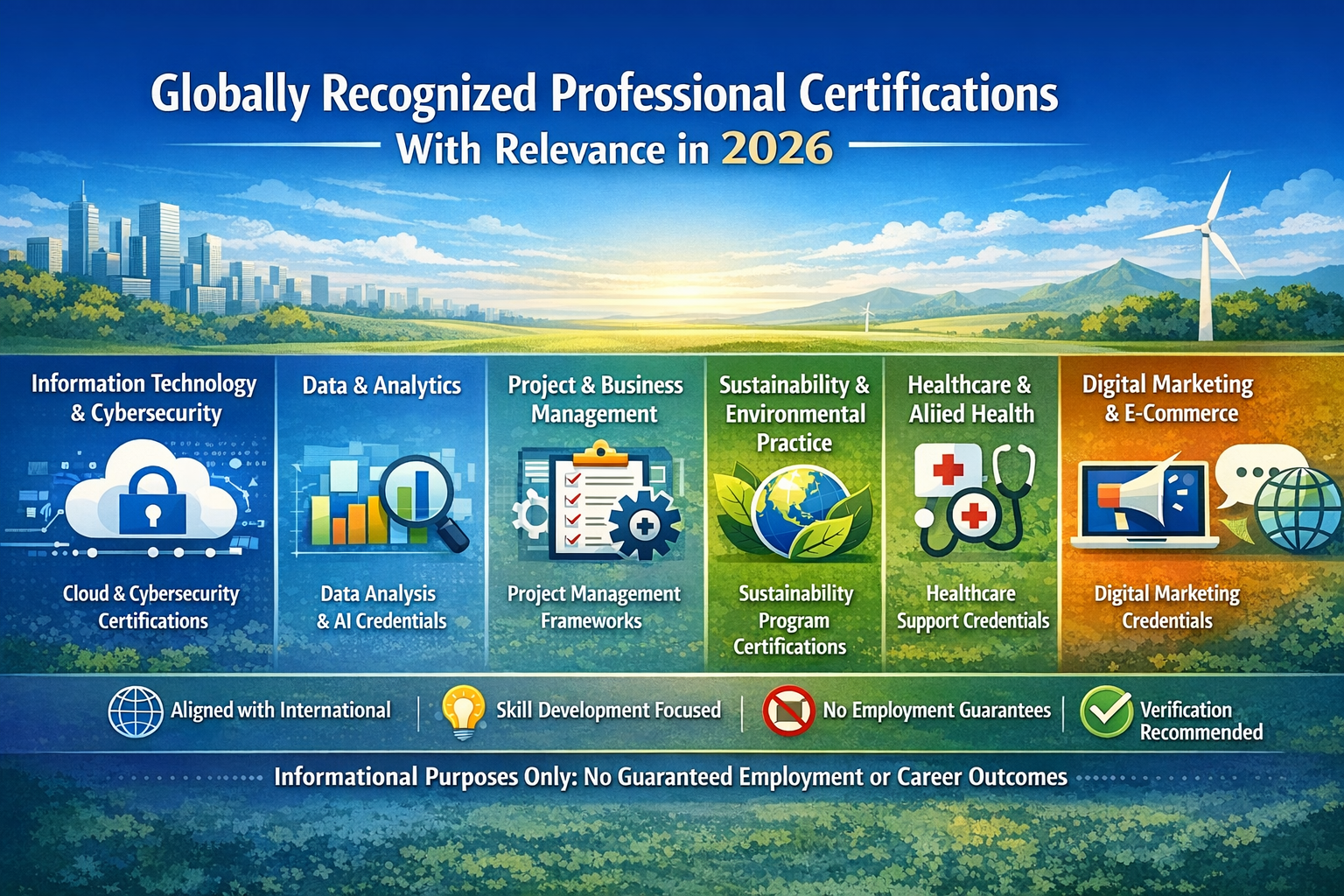
Infographic outlining widely recognized certification categories across industries in 2026.
Healthcare and Allied Health Support
Examples
-
Foundational credentials in health informatics
-
Patient care support certificates aligned with regional standards
-
Public health and health systems operations programs
Context:
Healthcare credentialing systems vary by jurisdiction and often include regulated licensing alongside optional certifications. Internationally referenced programs in health informatics or systems operations may support knowledge development in non-clinical roles.
Sustainability and Environmental Practice
Examples
-
Sustainability fundamentals and climate-aligned program certificates
-
Environmental management system frameworks
-
Energy and resource efficiency program credentials
Context:
Global sustainability frameworks, such as those referenced in UN and OECD skills discussions, underscore the integration of environmental considerations into organizational operations. Credentialing programs may reflect recognized standards for environmental and resource stewardship.
Language and Communication
Examples
Context:
Language proficiency and communication are foundational skills across sectors. Some assessments are independently administered with formally recognized scales tied to international standards.
FAQ
What is a professional certification?
A professional certification is a credential indicating that an individual has completed a set of learning objectives or assessments aligned with a defined body of knowledge.
How is a certification different from a license?
A license is typically a mandatory regulatory authorization to practice in certain professions, whereas a certification is often voluntary and related to demonstrating competency in a subject area.
Do certifications guarantee job offers?
No. Certifications represent learning and assessment outcomes; they do not, by themselves, guarantee employment, income, immigration status, or career advancement.
Trusted Sources
-
International Labour Organization (ILO) workforce development analyses
-
UNESCO global education standards and competence frameworks
-
OECD skills and labor market studies
-
National or regional professional standards authorities (where jurisdictionally relevant)
Disclaimer
This article is for general informational and educational purposes only. It does not constitute professional career, legal, immigration, or financial advice. References to certifications, training areas, or professional development pathways do not imply endorsement or guarantee of employment, income, or career outcomes. Readers are encouraged to verify information through official regulatory bodies and accreditation authorities and exercise independent judgment when making educational or professional decisions.
by iamrolanddiaz | Feb 20, 2026 | Principeng Hari
Introduction
Google Tag Manager (GTM) is commonly used in digital marketing to manage tracking codes without directly editing website source files. Many businesses use tag management systems to streamline analytics deployment, improve workflow efficiency, and reduce reliance on repeated developer updates. Implementation approaches and results may vary depending on website structure, platform rules, and measurement strategy.
Developed by Google, Google Tag Manager continues evolving alongside privacy updates, browser restrictions, and platform measurement standards in 2026. Beginners often use GTM to organize analytics tags, marketing pixels, and event tracking in a structured and scalable way.
What Is Google Tag Manager?
Google Tag Manager is a tag management system (TMS) that allows users to deploy and manage tracking scripts (called tags) through a centralized interface. Instead of adding multiple code snippets manually across pages, GTM enables structured tag deployment using triggers and variables.
In many implementations, GTM acts as a bridge between websites and measurement tools, helping marketers organize:
Actual measurement accuracy depends on correct configuration and ongoing validation.
Why Google Tag Manager Matters in 2026
Modern digital marketing increasingly relies on event-based tracking and privacy-aware data collection. Changes in browser policies and platform rules have encouraged marketers to use more structured measurement frameworks.
Common reasons GTM is used include:
-
Centralized tracking management
-
Reduced need for repeated code changes
-
Easier testing environments
-
Better alignment with event-driven analytics models
Requirements and best practices may differ across regions due to data privacy regulations and consent requirements.
Core Components of Google Tag Manager
Understanding the three core building blocks helps beginners implement GTM more effectively.
1. Tags
Tags are snippets of code used to send data to analytics or advertising platforms.
Examples may include:
Performance outcomes depend on correct trigger conditions and validation.
2. Triggers
Triggers define when a tag should fire.
Common trigger examples include:
-
Page views
-
Button clicks
-
Form submissions
-
Scroll depth tracking
Trigger accuracy varies based on website structure and user interaction patterns.
3. Variables
Variables store dynamic values used by tags and triggers.
Examples include:
-
Page URLs
-
Click text
-
Form IDs
-
Custom data layer values
Variables help make measurement setups more flexible and scalable.
Basic Google Tag Manager Setup (Beginner Workflow)
While implementation details vary by platform, a simplified workflow often includes:
-
Create a GTM account and container
-
Install the container snippet on your website
-
Configure a basic analytics tag
-
Set a page-view trigger
-
Use preview mode for validation
-
Publish the container after testing
Testing is commonly recommended to reduce tracking inconsistencies.
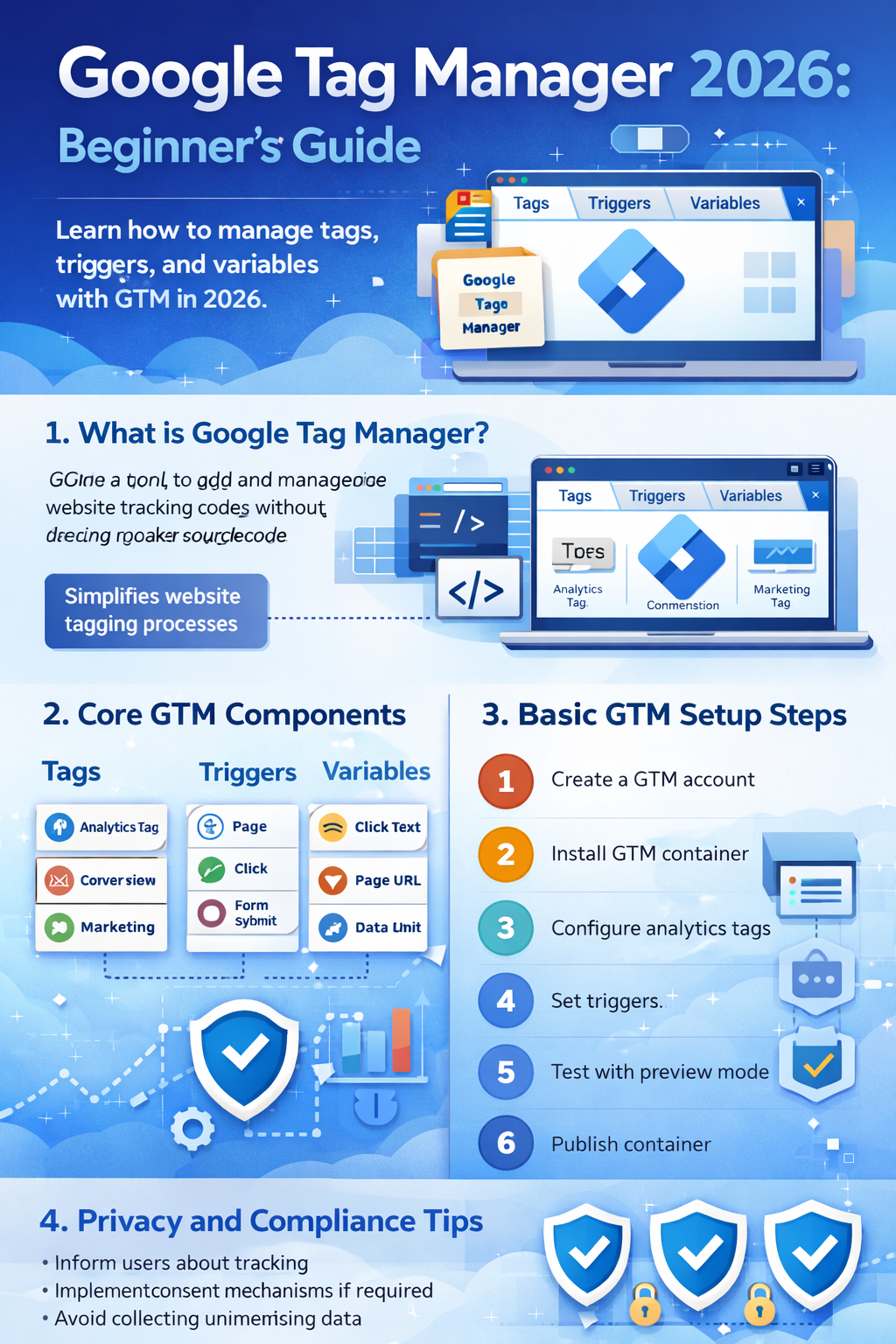
Overview infographic of Google Tag Manager 2026 features and setup workflow.
Understanding the Data Layer (Beginner Concept)
The data layer is a structured method used to pass information from a website into GTM. It helps organize event data more reliably compared to relying only on page elements.
Examples of data layer usage may include:
Implementation approaches often depend on website frameworks and developer collaboration.
Privacy and Compliance Considerations
Tracking implementation should follow transparent data practices and applicable privacy standards.
In many regions, commonly recommended practices include:
-
Informing users about tracking technologies
-
Implementing consent mechanisms where required
-
Avoiding unnecessary data collection
-
Reviewing platform policies regularly
Privacy requirements differ by jurisdiction and platform.
Platforms Commonly Integrated with Google Tag Manager
Google Tag Manager is often used alongside analytics and advertising ecosystems, depending on campaign strategy.
Common integrations may include:
Examples of platforms businesses frequently connect include:
-
Meta Platforms advertising tools
-
TikTok advertising measurement
-
YouTube engagement tracking
Implementation methods vary depending on platform requirements.
Beginner Mistakes to Avoid
Some common setup issues include:
-
Publishing containers without testing
-
Tracking duplicate events
-
Missing trigger conditions
-
Not documenting tag configurations
-
Ignoring consent requirements
Regular audits are often recommended to maintain tracking accuracy.
Practical Beginner Checklist
Google Tag Manager Starter Checklist
-
Install GTM container correctly
-
Use preview mode before publishing
-
Document tags and triggers
-
Validate event tracking
-
Review privacy and consent setup
-
Monitor analytics after deployment
Measurement reliability depends on ongoing testing and updates.
FAQ
Is Google Tag Manager difficult for beginners?
Google Tag Manager has a learning curve due to its event-based structure. With structured tutorials and practice, many beginners gradually become comfortable with basic configurations.
Does Google Tag Manager replace analytics tools?
Google Tag Manager does not replace analytics platforms. It is commonly used to deploy and manage tracking tags that send data to analytics systems.
Do I need coding skills to use Google Tag Manager?
Basic setups often require minimal coding, but more advanced implementations may involve developer collaboration depending on website complexity.
Trusted Sources & Standards
-
Google Search Central documentation
-
Google Analytics Help Center
-
Meta Business Help Center
-
TikTok Business Help Center
-
Global consumer protection and privacy guidance (general educational reference)
Summary
Google Tag Manager is a tag management system widely used to organize website tracking without editing source code repeatedly. Beginners typically learn how tags, triggers, and variables work together to manage analytics and marketing measurement. Implementation practices vary depending on platform rules, privacy requirements, and website structure, and results depend on correct configuration and ongoing testing.
Disclaimer
This content is provided for general educational purposes only. Digital marketing results vary depending on market conditions, platform rules, audience behavior, and execution.