by iamrolanddiaz | Feb 19, 2026 | Principeng Hari
What Is Google Search Console (GSC)?
Google Search Console (GSC) is a free tool from Google that helps website owners understand how their site appears in Google Search. It provides reporting and diagnostic insights such as which queries bring traffic, which pages are indexed, and whether Google encounters technical issues while crawling your website.
Unlike analytics platforms that track user behavior after visitors arrive, Search Console focuses on what happens before the click—how Google finds, understands, and ranks your content.
Why Google Search Console Matters for SEO in 2026
In 2026, SEO continues to evolve with AI-powered search experiences, rich results, and increasingly competitive content ecosystems. Google Search Console remains one of the most reliable tools for monitoring visibility because it uses data directly from Google Search systems.
Google Search Console is commonly used to:
-
monitor keyword visibility and organic clicks
-
identify technical indexing issues early
-
understand which pages Google is prioritizing
-
track performance changes after website updates
-
validate SEO improvements over time
While it does not provide every ranking factor or full keyword lists, it is still one of the strongest “source of truth” tools for organic search monitoring.
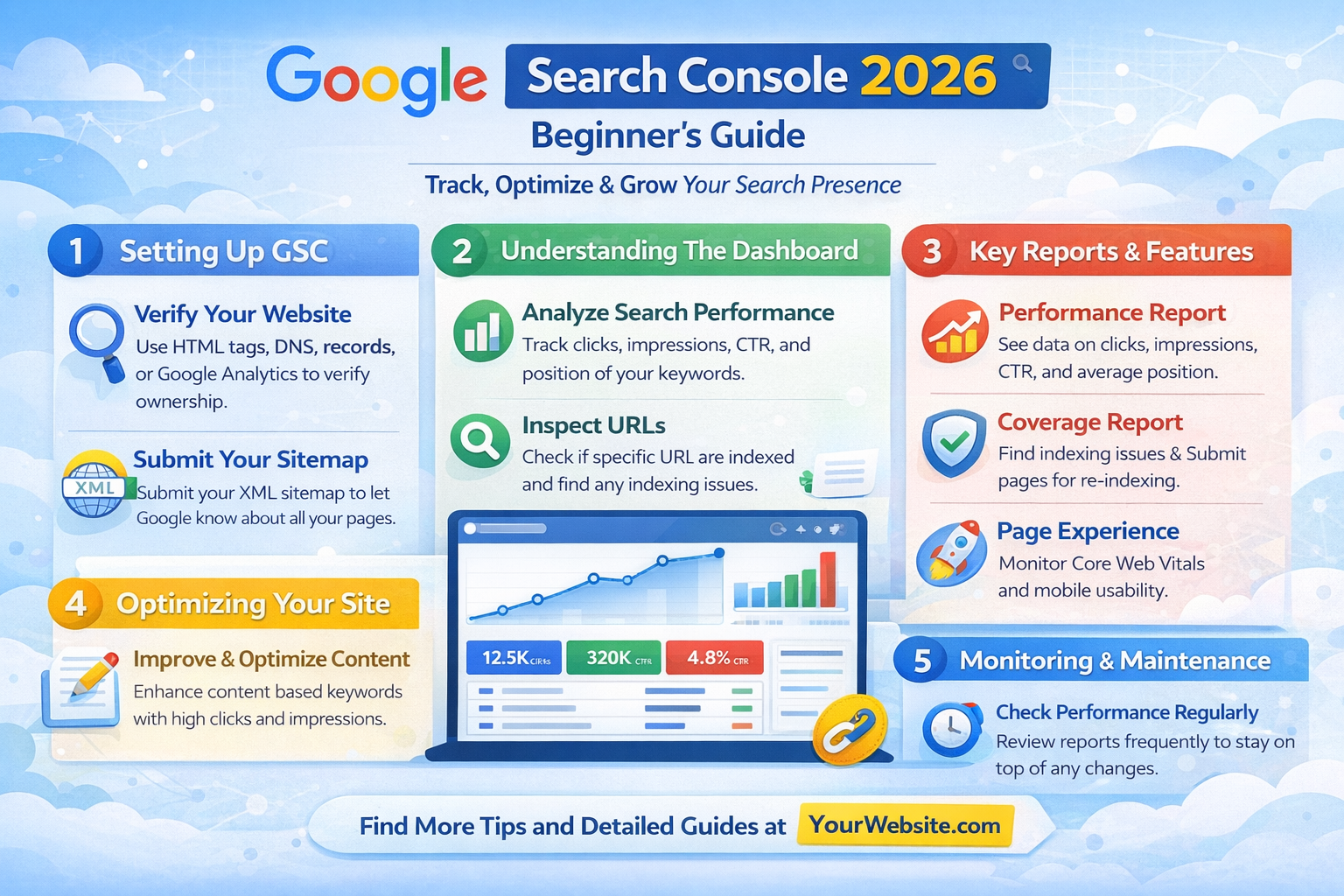
Structured visual layout presenting key interface sections and reporting categories.
How Google Search Console Works
Search Console works by connecting your website to Google’s indexing and search reporting systems.
Once verified, it can show:
-
what Googlebot crawls on your site
-
which pages are eligible to appear in search
-
search queries and page impressions
-
usability and experience signals (depending on site type)
It does not automatically improve rankings, but it can help you make better SEO decisions by showing what is working and what may need attention.
Setting Up Google Search Console (Step-by-Step)
To start using Search Console, you need to add your website as a “property” and verify ownership.
Step 1: Add a Property
Google provides two main property types:
Domain Property
-
tracks all subdomains and protocols
-
includes http, https, www, non-www
-
requires DNS verification
-
recommended for most businesses
URL Prefix Property
-
tracks only the exact URL entered
-
easier verification options
-
useful for smaller or test properties
For most beginners, Domain Property is recommended if you have access to DNS settings.
Step 2: Verify Website Ownership
Verification confirms you control the website. Common methods include:
Once verified, Google will begin collecting data. Some reports may take a few days to populate.
Understanding the Google Search Console Dashboard
After setup, you will see a dashboard with key reports. Beginners should focus on these first:
-
Performance (search traffic data)
-
Indexing / Pages (index coverage status)
-
Sitemaps (submission + crawling confirmation)
-
Experience / Enhancements (if applicable)
-
Manual Actions (penalties or compliance issues)
-
Security Issues (hacked site warnings)
Think of the dashboard as an SEO health and visibility monitor rather than a ranking “control panel.”
Performance Report Explained (Clicks, Impressions, CTR, Position)
The Performance report is one of the most useful parts of GSC. It shows how your site performs in Google Search results.
Key metrics include:
Clicks
The number of times users clicked your site from Google Search.
Impressions
How often your pages appeared in search results.
CTR (Click-Through Rate)
Clicks divided by impressions. A low CTR may suggest your title or meta description needs improvement.
Average Position
A general estimate of where your site ranks across queries. This number is best used for trend monitoring rather than exact ranking accuracy.
How to Find Keyword Opportunities
A common beginner strategy is to look for keywords with:
These keywords may represent “near-page-one” opportunities where improving content quality, headings, or snippet formatting could help visibility.
How to Compare Dates for SEO Tracking
Search Console allows you to compare time periods, which helps you evaluate:
Comparing 28 days vs previous 28 days is often a practical baseline for monitoring progress.
Indexing Report Explained (Pages, Crawling, Index Status)
The Indexing report shows which pages are indexed and which are excluded.
Common indexing statuses include:
-
Indexed (page is in Google’s index)
-
Not indexed (Google chose not to index it)
-
Excluded (blocked or intentionally not indexed)
-
Error (technical issues affecting indexing)
Indexing does not guarantee ranking, but it is a requirement for visibility in search results.
Common Indexing Issues Beginners See
Some common reasons pages may not be indexed include:
-
“Crawled – currently not indexed”
-
“Discovered – currently not indexed”
-
“Duplicate without user-selected canonical”
-
“Blocked by robots.txt”
-
“Alternate page with proper canonical tag”
-
“Soft 404”
-
“Redirect error”
These messages are not always “bad,” but they often indicate areas worth reviewing.
When “Discovered” or “Crawled” Doesn’t Mean Indexed
In many cases, Google can crawl your page but still decide not to index it. This can happen if the page is considered low-value, too similar to other pages, or lacking internal links.
Improving uniqueness, clarity, and internal linking may help in some cases, but outcomes vary depending on site quality and search competition.
How to Use the URL Inspection Tool
The URL Inspection Tool allows you to check a specific page and see what Google knows about it.
You can use it to:
-
confirm if a page is indexed
-
see the last crawl date
-
check canonical selection
-
identify crawling errors
-
request indexing (if eligible)
Request indexing is useful after publishing new content or fixing technical issues, but it does not guarantee immediate indexing.
How to Submit a Sitemap in Search Console
A sitemap helps Google discover important pages more efficiently.
Steps to submit a sitemap:
-
Go to Sitemaps in Search Console
-
Enter the sitemap URL (example: /sitemap.xml)
-
Click Submit
-
Monitor sitemap status and errors
If your sitemap is valid, Search Console will show whether Google successfully fetched it.
Submitting a sitemap is considered a best practice, especially for new websites or sites with many pages.
Enhancements Reports (Core Web Vitals, Mobile Usability, Rich Results)
Depending on your site, Search Console may show “Enhancements” such as:
Core Web Vitals
Provides performance signals based on user experience metrics. It may highlight pages with loading or stability issues.
Mobile Usability
Helps identify layout and usability problems on mobile devices, which can impact user experience.
Rich Results
Shows structured data eligibility (such as FAQ markup, product schema, or breadcrumbs). If errors exist, fixing them may improve rich snippet eligibility, depending on Google’s display rules.
These reports are most useful as diagnostic indicators rather than ranking predictors.
Manual Actions and Security Issues (What to Do If You See Warnings)
Manual Actions occur when Google applies a penalty due to violations of its spam policies. Security Issues may appear if your website is compromised.
If you see warnings:
-
review Google’s explanation inside Search Console
-
remove harmful content or spam pages
-
fix security vulnerabilities
-
request a review once resolved
It is generally recommended to address these issues quickly, as they can significantly impact visibility.
How to Use Search Console for Content Strategy
Search Console is not just a technical tool—it can also guide content planning.
Common content strategy uses include:
-
identifying blog topics based on rising impressions
-
improving older posts that rank on page 2
-
finding pages with high impressions but low clicks
-
identifying “content cannibalization” (multiple pages competing for similar queries)
A practical approach is to update content based on real query data rather than guessing what users search for.
How to Use Search Console for Technical SEO Checks
Technical SEO improvements are often easier when you have visibility into Google’s indexing signals.
Search Console can help you detect:
-
crawl errors
-
redirect problems
-
canonical misconfigurations
-
blocked pages
-
missing internal linking patterns
-
sudden drops in indexed pages
Even beginners can use these reports to start conversations with developers or hosting providers.
Common Beginner Mistakes in Google Search Console
Many users misinterpret Search Console reports. Common mistakes include:
-
assuming average position is exact ranking
-
panicking over every “excluded” URL
-
submitting the same sitemap repeatedly
-
requesting indexing too often
-
ignoring internal linking issues
-
treating Core Web Vitals as the only SEO priority
-
expecting instant traffic increases after setup
Search Console is best used as a long-term monitoring tool rather than a short-term results dashboard.
Best Practices for Using Google Search Console in 2026
If you want a stable workflow, these habits are commonly recommended:
-
check Performance trends weekly or monthly
-
submit sitemaps after major site changes
-
monitor indexing issues after publishing new content
-
review queries that trigger impressions but not clicks
-
use URL Inspection after major content updates
-
monitor manual actions and security warnings regularly
-
combine Search Console insights with analytics platforms for deeper decision-making
In many SEO workflows, Search Console is used alongside tools like GA4, tag managers, and website crawlers.
FAQ
1. Is Google Search Console free?
Yes. Google Search Console is generally available as a free tool for website owners and marketers.
2. How long does it take for Search Console data to appear?
In many cases, it may take a few days for initial performance and indexing reports to populate after verification.
3. Does submitting a sitemap guarantee indexing?
No. Submitting a sitemap helps discovery, but indexing decisions depend on many factors including content quality and site structure.
4. Can Search Console show all keywords my website ranks for?
Not always. It provides many query insights, but some queries may be omitted or grouped for privacy and reporting reasons.
5. What should I check first in Search Console as a beginner?
A practical starting point is the Performance report and Indexing report, since these directly affect search visibility and website discoverability.
Practical Checklist
Google Search Console Beginner Checklist (2026)
✅ Verify your site using Domain property if possible
✅ Submit your sitemap (sitemap.xml)
✅ Review the Performance report (queries + pages)
✅ Identify top pages by clicks and impressions
✅ Check Indexing report for excluded/error pages
✅ Use URL Inspection for newly published pages
✅ Fix robots.txt or canonical issues if needed
✅ Monitor Core Web Vitals and mobile usability reports
✅ Review security issues and manual actions monthly
✅ Use GSC insights to guide content updates
Trusted Sources / Standards
For best practices and official documentation, refer to:
-
Google Search Central documentation
-
Google Search Console Help Center
-
Google Search Spam Policies (Search Central)
-
Google Page Experience / Core Web Vitals guidance
-
FTC-style truth-in-advertising principles (for ethical marketing context)
-
Data privacy frameworks (GDPR-style and CCPA-style transparency principles)
Disclaimer
This content is provided for general educational purposes only. Digital marketing results vary depending on market conditions, platform rules, audience behavior, competition, and execution. This guide does not constitute legal or professional technical advice.
Summary
Google Search Console is a free Google tool that helps website owners monitor search performance, indexing status, and technical SEO issues. In 2026, it remains useful for tracking clicks, impressions, keyword visibility, and page indexing errors. Beginners can start by verifying their site, submitting a sitemap, reviewing performance trends, and using URL Inspection to troubleshoot indexing concerns.
by iamrolanddiaz | Feb 19, 2026 | Principeng Hari
Content Outline
- What Is GTM Consent Mode?
- Why Consent Mode Matters in 2026
- Consent Mode vs Cookie Banner: What’s the Difference?
- Consent Types Explained (ad_storage, analytics_storage, etc.)
- How GTM Consent Mode Works (Beginner Explanation)
- Step-by-Step Setup in Google Tag Manager
- Step 1 — Prepare Your Tracking Stack
- Step 2 — Configure Default Consent
- Step 3 — Set Consent Updates (After User Choice)
- Step 4 — Test Consent Mode Properly
- Recommended Default Consent Settings (Examples)
- Integrating Consent Mode with Cookie Banners (CMPs)
- Common GTM Consent Mode Mistakes to Avoid
- Best Practices for GA4 + Google Ads + Consent Mode
- Consent Mode Reporting Expectations (What Changes?)
- Practical Checklist
- FAQ
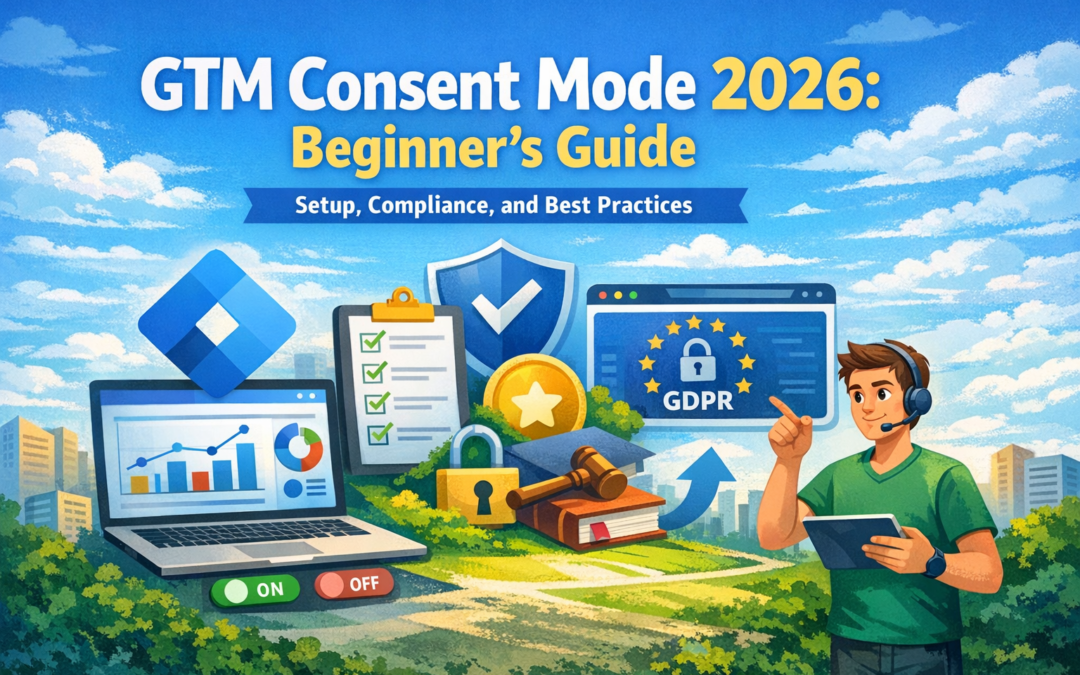
What Is GTM Consent Mode?
Google Tag Manager (GTM) Consent Mode is a privacy-focused setup that helps websites adjust how Google tags behave based on a visitor’s consent choices. Instead of firing tracking cookies immediately, GTM can send “consent signals” that indicate whether the user allowed analytics or advertising tracking.
Consent Mode is commonly used to align tracking with privacy expectations and data protection standards in many regions.
Why Consent Mode Matters in 2026
In 2026, digital marketing teams face increasing pressure to balance performance tracking with privacy compliance. Many regions have stricter expectations for how businesses handle cookies, remarketing, and behavioral tracking.
Consent Mode helps because it:
-
supports consent-based tag behavior
-
improves transparency and user trust
-
reduces risk of non-compliant tracking configurations
-
allows limited modeling signals (depending on platform behavior and setup)
This does not replace legal compliance, but it can support a more privacy-aware implementation.
Consent Mode vs Cookie Banner: What’s the Difference?
A common beginner misunderstanding is assuming Consent Mode is the same as a cookie banner.
Cookie Banner (CMP)
A cookie banner is the front-end interface that:
Consent Mode
Consent Mode is the back-end logic that:
-
tells Google tags what they are allowed to do
-
adjusts cookies and tracking behavior
-
ensures tags respond properly to consent status
In simple terms:
Cookie banners collect consent. Consent Mode enforces it inside tracking systems.
Consent Types Explained
Google Consent Mode uses multiple consent categories. The most common ones include:
| Consent Type |
What It Controls |
Typical Use |
| ad_storage |
Advertising cookies |
Google Ads remarketing |
| analytics_storage |
Analytics cookies |
GA4 session tracking |
| ad_user_data |
Ad-related user data |
Enhanced conversions logic |
| ad_personalization |
Personalization signals |
remarketing customization |
| functionality_storage |
site functionality cookies |
language preferences |
| security_storage |
security cookies |
fraud prevention |
Not all websites need every consent type. Many beginner setups focus on analytics_storage and ad_storage first.
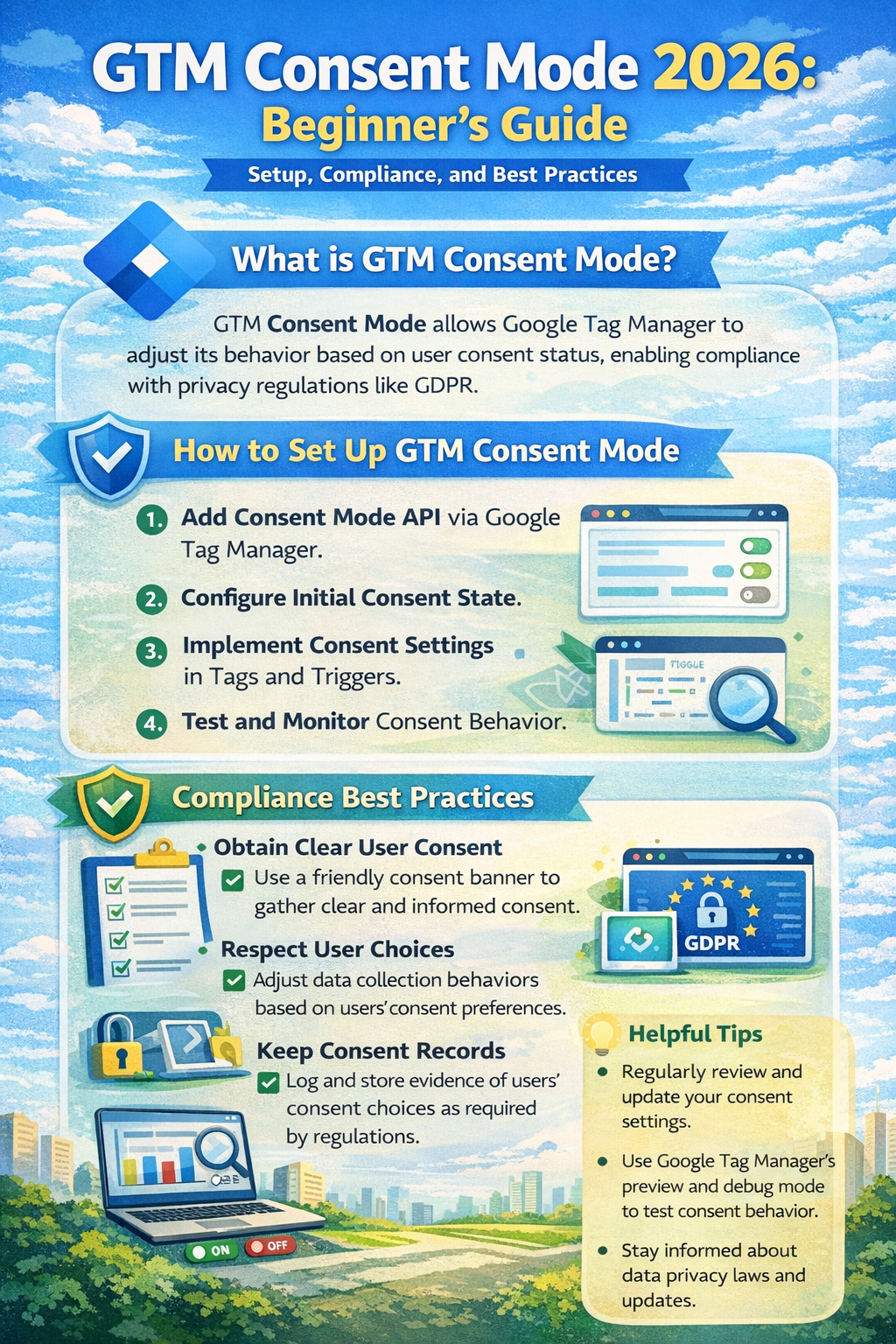
Structured visual summary of GTM Consent Mode 2026 configuration layers and consent state framework.
How GTM Consent Mode Works
Consent Mode works by setting rules such as:
-
If user consent is denied, tags may still load but behave in a limited way.
-
If user consent is granted, tags can store cookies and track normally.
In practice, this means:
This approach is often used to avoid firing full tracking cookies before consent is captured.
Step-by-Step Setup in Google Tag Manager
Step 1 — Prepare Your Tracking Stack
Before setting up Consent Mode, confirm:
-
your GTM container is installed correctly
-
GA4 configuration tag (or GA4 event tags) are present
-
Google Ads conversion tags are properly configured
-
you have a cookie banner or CMP available
Even a simple cookie banner can work if it can trigger consent updates.
Step 2 — Configure Default Consent in GTM
Default consent defines what happens before the user makes a choice.
Recommended beginner approach:
In GTM:
- Go to Tags
- Create a new tag
- Select Consent Initialization – Google Tag
- Configure default consent states
Example default settings:
This ensures tracking cookies are not stored before permission is granted.
Step 3 — Set Consent Updates After User Choice
Once the user accepts or rejects cookies, your cookie banner should trigger an event.
In GTM, create a tag that runs on the consent action event:
-
“Accept All Cookies”
-
“Accept Analytics”
-
“Reject All”
-
“Save Preferences”
Then use the Consent Update command to set values like:
If a user rejects ads but accepts analytics:
This gives more granular control and is considered a best practice in many compliance-focused setups.
Step 4 — Test Consent Mode Properly
Testing is essential because many consent setups appear correct but still fire cookies too early.
Recommended testing methods:
What to verify:
-
cookies do not appear before consent
-
tags behave differently depending on consent
-
consent update triggers are firing correctly
Recommended Default Consent Settings
Privacy-First Default (Recommended for many regions)
Analytics-Friendly Default (More aggressive, not always recommended)
This approach may not be appropriate in many jurisdictions unless analytics cookies are considered essential, which is not always the case.
Integrating Consent Mode with Cookie Banners
A Consent Management Platform (CMP) is usually the easiest way to implement Consent Mode correctly.
A CMP typically provides:
-
built-in cookie scanning
-
preference center UI
-
consent logs
-
triggers for GTM
Common integration flow:
- User lands on site
- Default consent = denied
- CMP banner displays
- User selects preferences
- CMP pushes consent status into GTM
- GTM updates consent mode states
- GA4 and Ads tags adjust accordingly
When using a CMP, confirm it supports:
Common GTM Consent Mode Mistakes to Avoid
❌ Setting consent tags to fire too late
Consent initialization must run early. Otherwise cookies may fire before consent.
❌ Forgetting to update consent after user action
If you set default denied but never update, you may lose analytics visibility entirely.
❌ Allowing tags to fire without consent checks
Some tags (especially custom HTML tags) can bypass consent controls unless configured properly.
❌ Not documenting consent categories
You should clearly map cookie categories to:
-
analytics
-
ads
-
functionality
This improves transparency and makes audits easier.
❌ Assuming Consent Mode is “legal compliance”
Consent Mode is a technical solution, not a legal certification.
Best Practices for GA4 + Google Ads + Consent Mode
Best practice checklist:
-
Implement default denied for analytics and ads unless justified
-
Use granular consent options (not only “accept all”)
-
Separate GA4 events from conversion tags for better control
-
Use server-side tagging carefully (still requires consent logic)
-
Maintain clear cookie and privacy policies
For Google Ads:
Consent Mode Reporting Expectations
Consent Mode may affect reporting and attribution because fewer cookies are stored when users deny consent.
In many setups, you may observe:
-
reduced remarketing audience size
-
fewer attributed conversions
-
more reliance on modeled data (depending on platform behavior)
However, Consent Mode can still support measurement continuity in a more privacy-respecting way.
Actual reporting outcomes vary based on:
-
traffic volume
-
consent rate
-
regional rules
-
tag setup quality
Practical Checklist
✅ GTM installed correctly
✅ GA4 tag configured
✅ Google Ads conversion tag configured (if needed)
✅ Consent Initialization tag created
✅ Default consent states set to denied
✅ Cookie banner connected to GTM
✅ Consent update triggers created
✅ Consent categories mapped properly
✅ Testing done in Preview + browser cookies
✅ Privacy policy and cookie notice updated
✅ Documentation saved for audit readiness
FAQ
What is the difference between Consent Mode v2 and older Consent Mode?
Consent Mode v2 expands consent signals and aligns better with modern advertising privacy requirements, especially for Google Ads-related data signals.
Do I still need a cookie banner if I use GTM Consent Mode?
Yes. Consent Mode controls tag behavior, but a cookie banner or CMP is typically required to collect user preferences.
Will Consent Mode reduce my GA4 traffic?
It may reduce tracked sessions and events if users deny analytics consent. Reporting impact depends on consent rates and implementation.
Is GTM Consent Mode required for all websites?
Not always, but it is widely recommended for websites using Google tags in regions where consent-based tracking is expected.
Can I use Consent Mode with non-Google tags?
Yes, but you may need additional GTM consent checks and tag-level controls to prevent third-party cookies from firing without consent.
Trusted Sources / Standards
-
Google Tag Manager Documentation (Consent Mode and consent settings)
-
Google Analytics (GA4) Documentation
-
Google Ads Help Center (conversion tracking policies)
-
GDPR-style transparency and consent principles (general reference)
-
Data privacy best practices aligned with global consumer protection expectations
Disclaimer
This content is provided for general educational purposes only. Digital marketing results vary depending on market conditions, platform rules, audience behavior, and execution. Consent requirements may differ by jurisdiction, so businesses should review applicable privacy laws and platform policies.
Summary
GTM Consent Mode in 2026 helps websites adjust Google tag behavior based on user consent preferences. It works alongside a cookie banner by setting default consent states and updating them after a visitor accepts or rejects tracking. A proper setup improves privacy alignment, reduces compliance risk, and supports more responsible analytics and advertising measurement depending on platform capabilities.
by iamrolanddiaz | Feb 19, 2026 | Principeng Hari
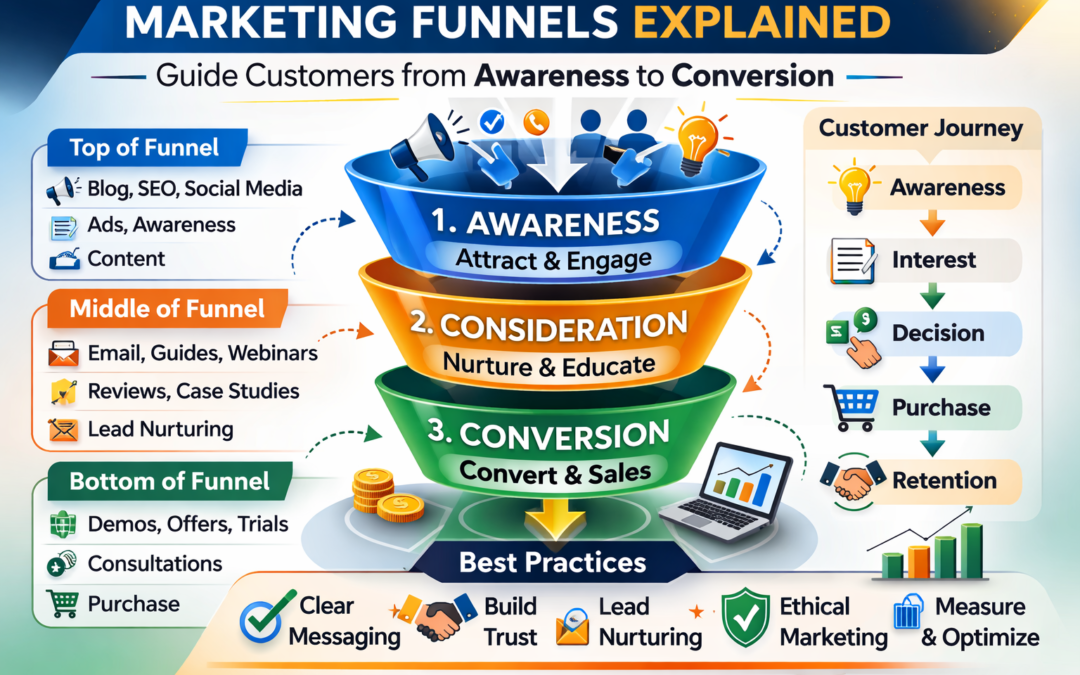
A marketing funnel is a framework used to illustrate the stages a potential customer passes through before making a purchase or completing a desired action. Funnels help marketers understand audience behavior, tailor messaging, and provide value at each stage of the customer journey.
The Stages of a Marketing Funnel
Top of Funnel (Awareness)
At this stage, the goal is to make your audience aware of your brand or product. Common strategies include content marketing, social media engagement, and search engine optimization. This stage focuses on education and information rather than direct selling.
Middle of Funnel (Consideration)
Potential customers are now evaluating options. Marketers can provide detailed guides, case studies, email newsletters, and webinars to help prospects understand solutions available. Nurturing trust and credibility is key.
Bottom of Funnel (Conversion)
This stage focuses on converting interested leads into customers. Tactics may include product demos, free trials, consultations, or comparison tools. Ethical funnel design ensures transparency, avoids pressure tactics, and clearly communicates value and costs.
How Marketing Funnels Help Businesses
-
Organize marketing activities according to the buyer’s journey.
-
Identify content and messaging gaps.
-
Measure engagement and optimize campaigns responsibly.
-
Improve lead nurturing without resorting to manipulative tactics.
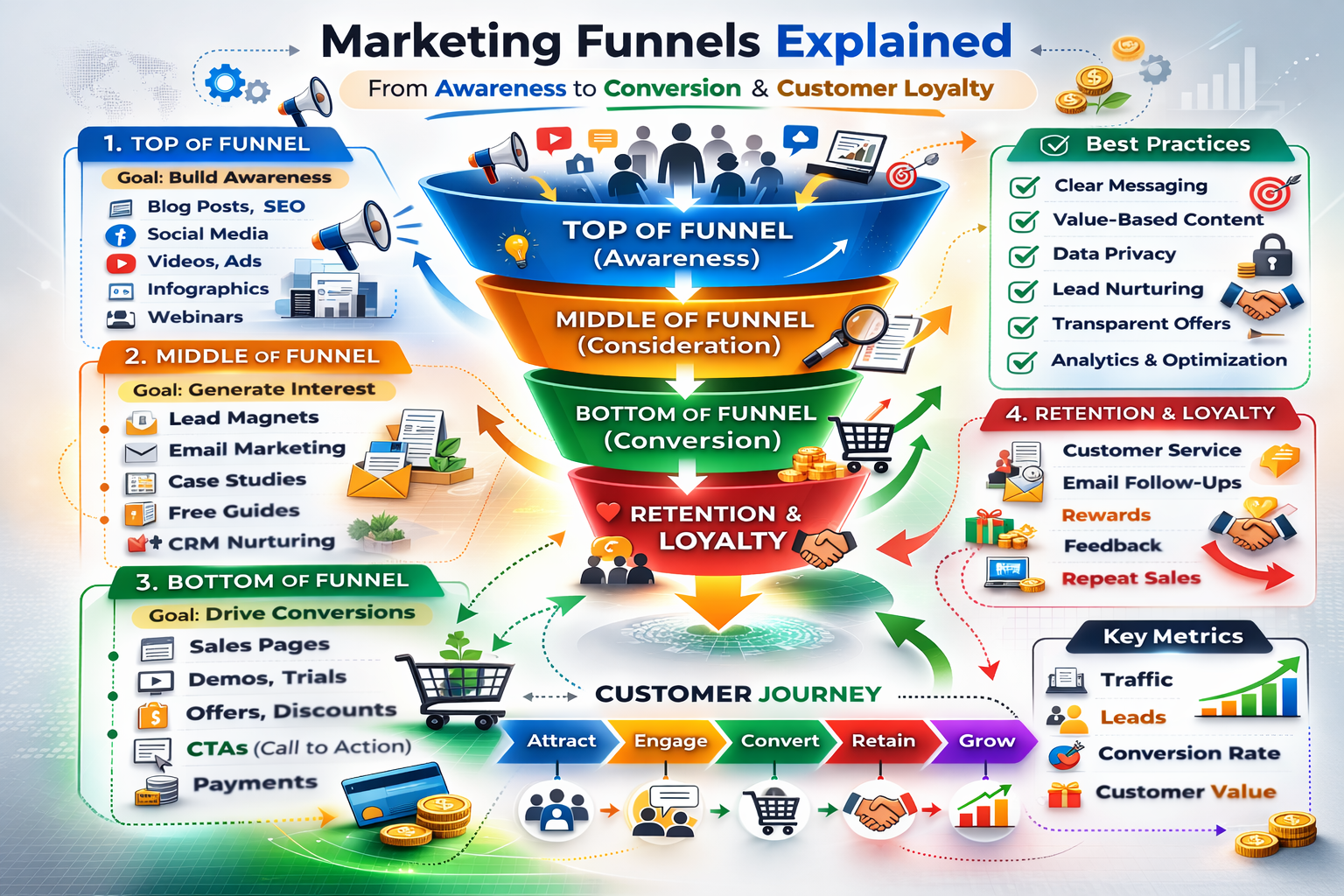
Infographic depicting stages of marketing funnels and key engagement points globally.
Best Practices for Ethical Funnel Management
-
Provide clear information and disclosures.
-
Avoid misleading claims about outcomes or performance.
-
Respect data privacy and consent regulations.
-
Align messaging with audience needs and expectations.
Common Funnel Mistakes to Avoid
-
Using clickbait or fake urgency.
-
Ignoring customer feedback and engagement data.
-
Skipping nurture stages and pushing for early conversions.
-
Collecting personal data without proper disclosure.
Checklist: Building a Simple Marketing Funnel
FAQ
Q1: Can a funnel work for small businesses?
A1: Yes, marketing funnels can be adapted to businesses of any size, depending on resources and audience needs.
Q2: Do all leads go through the same funnel?
A2: No, funnels may vary depending on product, audience segment, and customer behavior.
Q3: How do I measure funnel success?
A3: Metrics can include engagement rates, lead quality, conversion rates, and customer retention while respecting privacy regulations.
Trusted Sources / Standards
Disclaimer
“This content is provided for general educational purposes only. Digital marketing results vary depending on market conditions, platform rules, audience behavior, and execution.”
Summary
Marketing funnels outline the journey potential customers take from awareness to purchase. By mapping top, middle, and bottom funnel stages, businesses can deliver relevant content, nurture leads, and guide conversions responsibly. Ethical funnel management ensures transparency, data privacy, and audience trust while helping marketers optimize campaigns in many regions without using manipulative tactics.

by iamrolanddiaz | Feb 16, 2026 | Principeng Hari
Agentic AI is a type of artificial intelligence designed to act with autonomy — meaning it can plan, make decisions, and carry out multi-step tasks with limited human supervision rather than just responding to single prompts.
Think of it as the shift from:
- Traditional AI: “Tell me what to do.”
- Generative AI: “Create something based on my request.”
- Agentic AI: “Here’s the goal — figure out the steps and execute them.”
🧠 Simple definition
Agentic AI refers to AI systems made up of AI agents that can:
- reason about goals
- plan workflows
- use tools or external systems
- take actions automatically
- adapt based on feedback or changing conditions
This moves AI from just generating answers to performing tasks.

Visual layout presenting key concepts related to Agentic AI.
⚙️ Core characteristics of agentic AI
Most definitions highlight these features:
1️⃣ Autonomy
The system can operate without constant human input, handling tasks end-to-end once given a goal.
2️⃣ Planning & reasoning
Instead of a single response, it breaks problems into steps and decides how to proceed.
3️⃣ Tool use
Agentic systems can interact with APIs, databases, software, or other tools to gather information or take actions.
4️⃣ Adaptability
Agents can learn from feedback and adjust strategies over time.
5️⃣ Goal-driven behavior
The AI focuses on achieving outcomes rather than only generating text.
🆚 Agentic AI vs. regular AI
| Type |
How it works |
Example |
| Traditional automation |
Fixed rules |
Auto-reply email |
| Generative AI |
|
|
| Agentic AI |
Plans + acts |
Books meetings, gathers data, updates records automatically |
🧩 Real-world examples
- A customer support agent that checks account data, follows workflows, and completes actions instead of only answering questions.
- Systems coordinating multiple specialized agents to complete larger tasks together.
- Enterprise tools that monitor systems and take predefined actions with oversight.
🏗️ How agentic AI usually works
- Perceive → gather data
- Reason → analyze and plan
- Act → use tools or perform actions
- Reflect → evaluate results and adjust
This repeated cycle allows longer workflows than simple prompt-response systems.
⚠️ Why people are talking about it now
Experts see agentic AI as the next step after generative AI because it moves AI:
- from knowledge → to action
- from answering → to executing workflows
At the same time, it introduces new challenges around safety, governance, and oversight because autonomous systems can make decisions independently.
🧠 One-sentence explanation
Agentic AI = AI that can set plans and take actions toward goals, not just generate responses.
Agentic AI FAQ
Q1: What is Agentic AI?
A: Agentic AI is a type of artificial intelligence designed to act autonomously. It can plan, make decisions, and complete multi-step tasks with minimal human supervision, going beyond traditional or generative AI that only responds to prompts.
Q2: How is Agentic AI different from regular AI?
A: Unlike traditional AI, which follows fixed rules, or generative AI, which creates content based on instructions, Agentic AI plans workflows, uses tools, and executes actions automatically to achieve goals.
Q3: What are the main features of Agentic AI?
A: Core features include:
- Autonomy – Operates without constant human input.
- Planning & reasoning – Breaks tasks into steps and decides the next actions.
- Tool use – Interacts with software, APIs, and databases.
- Adaptability – Learns from feedback and adjusts strategies.
- Goal-driven behavior – Focuses on completing outcomes, not just generating text.
Q4: Can you give examples of Agentic AI in the real world?
A: Examples include:
- Customer support agents that gather account data and complete workflows automatically.
- Systems coordinating multiple AI agents for complex tasks.
- Enterprise monitoring tools that detect issues and act on them autonomously.
Q5: How does Agentic AI work?
A: Agentic AI works in cycles:
- Perceive – Gather relevant data.
- Reason – Analyze information and plan next steps.
- Act – Execute tasks using tools or systems.
- Reflect – Evaluate outcomes and improve future actions.
Q6: Why is Agentic AI gaining attention now?
A: Experts view it as the next evolution after generative AI, shifting AI from knowledge and responses to independent action. It promises higher efficiency but also raises questions about safety, oversight, and governance.
Q7: Do I need technical skills to use Agentic AI?
A: While understanding workflows and AI concepts helps, many Agentic AI tools are designed to be user-friendly, enabling businesses to automate tasks without deep technical knowledge.
Q8: What are the benefits of using Agentic AI?
A: Benefits include:
- Automating repetitive or complex tasks.
- Improving efficiency and decision-making.
- Reducing reliance on human supervision for multi-step workflows.
- Enabling AI-driven goal completion rather than just information retrieval.
Q9: Is Agentic AI safe to use?
A: Safety depends on proper oversight, governance, and ethical implementation. Autonomous AI can make independent decisions, so monitoring and clear policies are essential.
Q10: Can Agentic AI replace human jobs?
A: Agentic AI is designed to assist and automate tasks rather than fully replace humans. It works best when augmenting human roles, improving efficiency, and handling repetitive or structured workflows.
by iamrolanddiaz | Feb 16, 2026 | Principeng Hari
Content Outline
- Why Understanding the Difference Matters
- What is Marketing?
- What is Growth?
- What is Brand?
- Comparing Marketing, Growth, and Brand
- How Businesses Use Each Strategically
- Key Takeaways
- Practical Checklist
- FAQ
Why Understanding the Difference Matters
In today’s competitive business landscape, terms like marketing, growth, and brand are often used interchangeably. However, each serves a unique role in shaping a company’s strategy. Understanding these differences helps leaders make informed decisions, allocate resources effectively, and communicate with stakeholders clearly.
This article provides an educational overview that is globally compliant, ethically framed, and safe for digital platforms.
What is Marketing?
Marketing is the practice of communicating a business’s products or services to an audience to create awareness, interest, and engagement. It encompasses activities such as:
-
Content creation (blogs, social media posts, videos)
-
Advertising campaigns (paid and organic)
-
Search engine optimization (SEO)
-
Customer research and insights
Marketing focuses on strategic communication and value delivery rather than instant results. It is foundational for attracting attention and maintaining relevance in a crowded market.
What is Growth?
Growth refers to the strategies and tactics aimed at scaling a business, increasing customer acquisition, revenue, or market share. Growth strategies often combine marketing efforts with product improvements, sales optimization, and user experience enhancements.
Key elements include:
-
Conversion rate optimization
-
Retention programs and loyalty initiatives
-
Experimentation and analytics-based decision-making
-
Cross-channel campaigns aligned with performance metrics
While marketing creates awareness, growth emphasizes measurable expansion and often relies on iterative testing to find what works.
What is Brand?
Brand represents the perception, reputation, and identity of a company or product in the minds of customers. Strong brands convey trust, credibility, and consistency. Branding includes:
-
Visual identity (logos, color palette, typography)
-
Messaging tone and voice
-
Mission, values, and storytelling
-
Customer experience and service standards
Branding is less about immediate conversions and more about long-term relationships and loyalty. It provides a framework that marketing and growth strategies operate within.
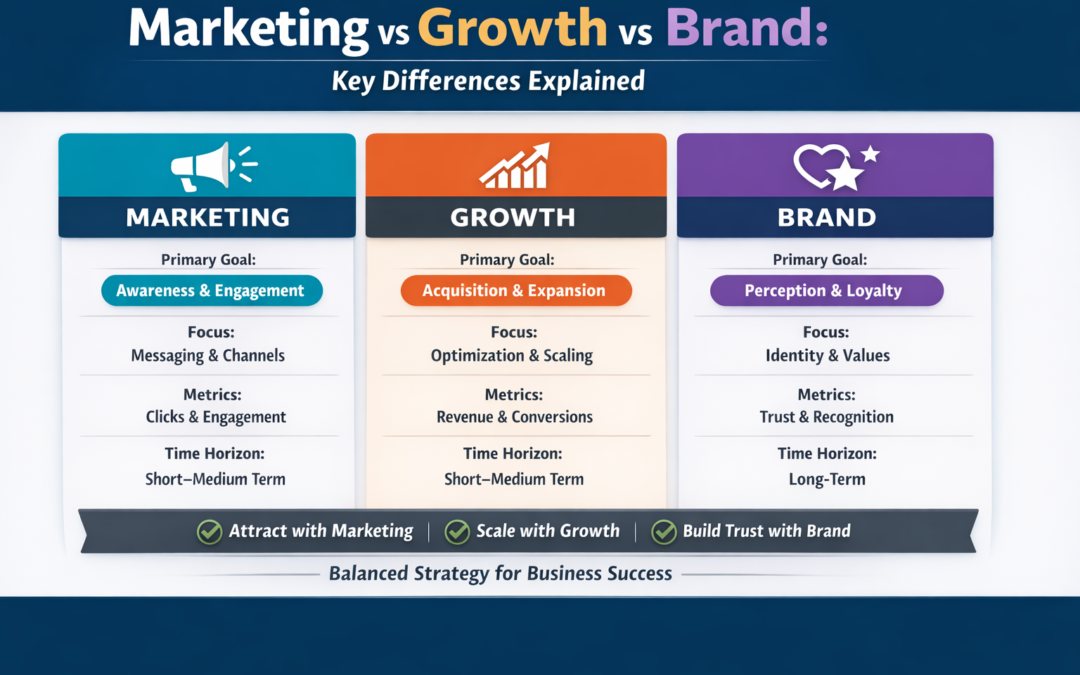
Comparing Marketing, Growth, and Brand
| Aspect |
Marketing |
Growth |
Brand |
| Primary Goal |
Awareness & engagement |
Acquisition & expansion |
Perception & loyalty |
| Time Horizon |
Short–medium |
Short–medium |
Long-term |
| Metrics |
Clicks, impressions, engagement |
Conversion rates, revenue growth |
Brand recall, NPS, trust |
| Focus |
Messaging & channels |
Experiments & optimization |
Identity & values |
Understanding these distinctions allows businesses to align marketing campaigns, growth initiatives, and brand development for maximum strategic impact.
How Businesses Use Each Strategically
- Marketing campaigns are often used to attract attention and educate potential customers.
- Growth strategies focus on testing channels, optimizing funnels, and scaling successful tactics.
- Brand initiatives ensure consistent messaging, build trust, and support long-term retention.
A balanced approach integrates all three, ensuring that short-term growth does not compromise brand integrity, and marketing activities are guided by a cohesive identity.
Key Takeaways
-
Marketing = Communication & awareness
-
Growth = Expansion & measurable results
-
Brand = Perception & long-term trust
-
All three should work together in a compliant, ethical, and strategic manner
Practical Checklist
-
Define your marketing objectives clearly
-
Identify growth metrics for experimentation
-
Audit brand messaging and visual identity
-
Align marketing campaigns with brand values
-
Track performance ethically and transparently
FAQ
Q1: Can growth replace marketing?
A1: No, growth often relies on marketing to generate awareness and initial engagement. They are complementary strategies.
Q2: How does brand impact conversions?
A2: Strong branding builds trust, which indirectly supports higher engagement and conversion rates over time.
Q3: Should small businesses prioritize brand or growth?
A3: Both are important. Early-stage businesses may focus on marketing and growth to establish presence while maintaining brand consistency.
Trusted Sources / Standards
-
Google Search Central (SEO & AEO Guidelines)
-
Meta Business Help Center (Advertising & Brand Policies)
-
TikTok Business Documentation (Platform Marketing Compliance)
-
FTC Consumer Guidance (Truth in Advertising)
-
Government Consumer Protection Agencies (e.g., Philippines RA 7394, RA 8792, RA 10173)
Disclaimer
“This content is provided for general educational purposes only. Digital marketing results vary depending on market conditions, platform rules, audience behavior, and execution.”
Summary
Marketing, growth, and brand serve distinct roles in business strategy. Marketing builds awareness, growth drives measurable expansion, and brand establishes long-term trust. Together, they guide decisions, optimize campaigns, and strengthen market presence. This overview provides an educational framework that is ethical, compliant, and safe for global digital marketing applications.
by iamrolanddiaz | Feb 16, 2026 | Principeng Hari
Content Outline
-
Definition and purpose
-
Stages and structure
-
Template + example map
-
Metrics and optimization
-
Tools + best practices
What Is Customer Journey Mapping?
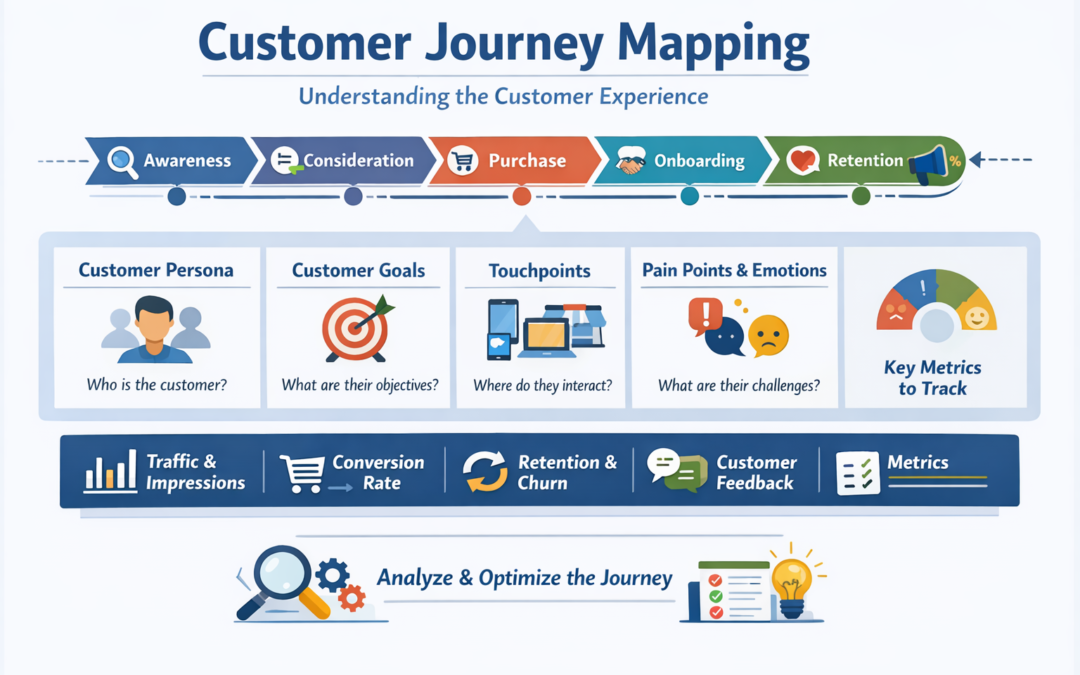
Customer journey mapping is the process of visualizing how a customer discovers, evaluates, purchases, and continues engaging with a brand across multiple touchpoints.
Instead of focusing only on sales, a journey map helps businesses understand customer behavior, emotions, expectations, and friction points from the customer’s perspective.
A well-built journey map is commonly used to improve marketing campaigns, website experience, support processes, and customer retention strategies.
Customer Journey vs Buyer Journey
These terms are often confused, but they are not identical.
| Concept |
Focus |
Best Used For |
| Buyer Journey |
Decision-making before purchase |
Lead generation, sales funnels |
| Customer Journey |
Full lifecycle before and after purchase |
Customer experience, loyalty, retention |
In simple terms: the buyer journey often ends at purchase, while the customer journey continues after purchase.
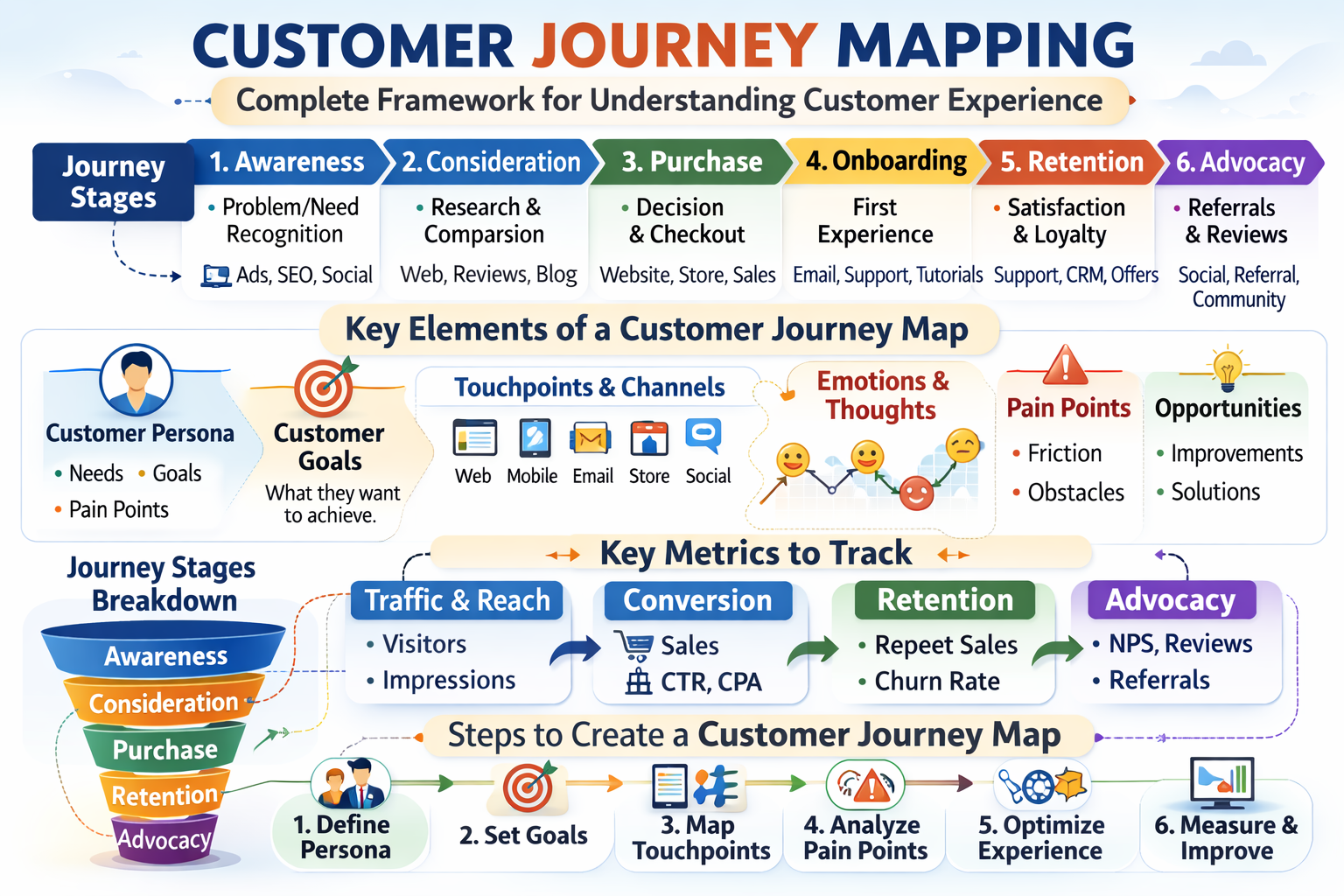
Customer journey mapping infographic showing stages, touchpoints, and measurement categories.
Why Customer Journey Mapping Matters
Customer journey mapping is useful because it helps organizations:
-
Identify what customers struggle with at each stage
-
Understand which channels influence decisions
-
Improve marketing message consistency
-
Reduce drop-offs in the funnel
-
Improve customer satisfaction and retention
-
Align sales, marketing, and customer service teams
It also supports better budgeting because you can focus resources on touchpoints that matter most.
Core Stages of a Customer Journey
Many models exist, but a globally common structure includes:
1. Awareness
The customer realizes they have a problem or need.
Common touchpoints:
Customer question:
“What is this problem, and what solutions exist?”
2. Consideration
The customer compares options and evaluates brands.
Common touchpoints:
-
product pages
-
reviews and ratings
-
webinars
-
comparison blogs
-
FAQ pages
Customer question:
“Which option fits my needs best?”
3. Conversion / Purchase
The customer decides and takes action.
Common touchpoints:
Customer question:
“Can I trust this business enough to buy?”
4. Onboarding / First Use
The customer starts using the product or service.
Common touchpoints:
-
welcome email
-
tutorials
-
packaging instructions
-
customer support
Customer question:
“Did I make the right choice?”
5. Retention / Loyalty
The customer continues purchasing or renewing.
Common touchpoints:
-
loyalty programs
-
customer success calls
-
newsletters
-
personalized offers
-
community groups
Customer question:
“Is this brand still valuable to me?”
6. Advocacy
The customer becomes a promoter and refers others.
Common touchpoints:
-
review platforms
-
referrals
-
social media sharing
-
testimonials
Customer question:
“Do I recommend this brand to others?”
Key Elements of a Customer Journey Map
A good customer journey map is more than a funnel diagram. It includes:
1. Customer Persona
A journey map should represent a specific type of customer (not “everyone”).
Examples:
2. Customer Goals
Each stage has a different goal.
Example:
-
Awareness = understand options
-
Consideration = compare solutions
-
Purchase = reduce risk and uncertainty
3. Touchpoints and Channels
List every place where customers interact with your business, such as:
-
website
-
ads
-
social media
-
email
-
customer service
-
physical store
4. Customer Emotions and Motivations
Customer decisions are not purely logical.
Your map should include likely emotions like:
5. Pain Points and Friction
These are the “drop-off triggers” that cause customers to stop.
Examples:
6. Opportunities for Improvement
This is where marketing becomes strategic.
Examples:
Step-by-Step Guide to Create a Customer Journey Map
Step 1: Choose One Customer Persona
Start with a single customer profile.
Avoid vague personas like “general audience.”
Use realistic details such as:
Step 2: Define the Customer Goal
Write the customer’s main objective.
Example:
“I want to find a safe and affordable travel package.”
Step 3: List the Journey Stages
Use a standard structure like:
Awareness → Consideration → Purchase → Onboarding → Retention → Advocacy
Keep it consistent across teams.
Step 4: Identify Touchpoints per Stage
Ask: Where does the customer interact with us here?
Examples:
-
Awareness: Instagram Reels, SEO blog
-
Consideration: product comparison page
-
Purchase: checkout and payment
-
Onboarding: email series, tutorial
-
Retention: newsletter and customer support
-
Advocacy: referral program
Step 5: Map Customer Questions
This is one of the most valuable parts.
Examples:
These questions directly become:
Step 6: Identify Barriers and Drop-Off Points
Look for:
This helps reduce wasted ad spend.
Step 7: Add Metrics for Each Stage
Attach measurable KPIs such as:
-
Awareness: impressions, organic traffic
-
Consideration: time on page, email signups
-
Purchase: conversion rate, cart abandonment
-
Retention: repeat purchase rate, churn
-
Advocacy: referral rate, reviews count
Step 8: Build Improvements and Assign Owners
A journey map is only useful if it results in action.
Assign:
-
marketing team → content improvements
-
UX team → landing page optimization
-
customer service → response workflow
-
sales team → scripts and objection handling
Customer Journey Map Template (Simple Format)
| Stage |
Customer Goal |
Touchpoints |
Customer Questions |
Pain Points |
Improvement Opportunities |
| Awareness |
Discover solutions |
Google, TikTok, blog |
“What is best?” |
confusing content |
create beginner guide |
| Consideration |
Compare options |
reviews, pricing page |
“Can I trust them?” |
unclear policies |
add trust badges & FAQ |
| Purchase |
Buy safely |
checkout, payment |
“Is payment secure?” |
too many steps |
simplify checkout |
| Onboarding |
Start using |
welcome email |
“How do I start?” |
unclear instructions |
onboarding email sequence |
| Retention |
Stay satisfied |
support, newsletter |
“Is this still worth it?” |
slow support |
faster response system |
| Advocacy |
Recommend |
referrals, reviews |
“How do I share?” |
no referral incentive |
referral program |
This format is widely used because it is easy for teams to collaborate on.
Common Mistakes to Avoid
1. Mapping the company process instead of the customer experience
A customer journey map must reflect customer reality, not internal workflow.
2. Using too many personas at once
Start with one persona, then expand.
3. Ignoring post-purchase experience
Many businesses only map until purchase, but loyalty often comes from onboarding and support.
4. Not using real data
Use:
-
analytics
-
support tickets
-
surveys
-
review insights
-
sales call notes
5. Creating a map but not updating it
Customer behavior changes as platforms and trends evolve.
Metrics to Track per Journey Stage
| Stage |
Metrics to Track |
| Awareness |
impressions, reach, organic traffic, brand searches |
| Consideration |
bounce rate, time on page, lead form submissions |
| Purchase |
conversion rate, cart abandonment, checkout completion |
| Onboarding |
activation rate, product usage, tutorial completion |
| Retention |
repeat purchase rate, churn, customer lifetime value (CLV) |
| Advocacy |
referrals, reviews, NPS (if used), social mentions |
Metrics should be interpreted carefully since performance varies by market and channel.
Tools for Customer Journey Mapping
Depending on your team setup, common tools include:
-
Google Analytics (behavior insights)
-
CRM platforms (customer lifecycle tracking)
-
spreadsheet templates (simple and accessible)
-
UX tools like Figma (visual mapping)
-
project tools like Notion or Trello (team collaboration)
Tool choice depends on company size and workflow.
Practical Checklist
✅ Choose one persona
✅ Define customer goal
✅ Break journey into stages
✅ List touchpoints per stage
✅ Add customer questions per stage
✅ Identify pain points and drop-offs
✅ Attach measurable KPIs
✅ Assign owners for improvements
✅ Review and update quarterly
FAQ
Q1: What is the main purpose of customer journey mapping?
Customer journey mapping helps businesses understand customer behavior, identify friction points, and improve marketing, sales, and customer experience across touchpoints.
Q2: How is customer journey mapping different from a sales funnel?
A sales funnel focuses on conversion stages, while a customer journey map includes emotions, touchpoints, and post-purchase experiences like retention and loyalty.
Q3: How often should a customer journey map be updated?
Many businesses update journey maps quarterly or after major product, pricing, or platform changes, since customer behavior evolves over time.
Q4: Do small businesses need customer journey mapping?
Yes. Even a simple journey map can help small businesses improve content strategy, customer support flow, and conversion messaging.
Trusted Sources / Standards
-
Google Search Central (SEO and content quality guidance)
-
Meta Business Help Center (ads and policy standards)
-
TikTok Business Help Center (advertising rules and best practices)
-
FTC Consumer Guidance (truth-in-advertising principles)
-
General GDPR/CCPA privacy principles (transparency and consent)
Disclaimer
This content is provided for general educational purposes only. Digital marketing results vary depending on market conditions, platform rules, audience behavior, and execution.
Summary
Customer journey mapping is a strategy tool used to visualize how customers discover, evaluate, purchase, and continue engaging with a business across different touchpoints. A strong journey map includes customer stages, goals, questions, emotions, pain points, and measurable metrics. Businesses often use it to improve marketing alignment, reduce funnel drop-offs, and strengthen customer retention.
by iamrolanddiaz | Feb 16, 2026 | Principeng Hari
Content Outline
- Introduction to Digital Marketing
- Key Channels of Digital Marketing
- Search Engine Optimization (SEO)
- Social Media Marketing
- Email Marketing
- Paid Advertising (PPC)
- Content Marketing
- Benefits of Digital Marketing
- Common Digital Marketing Strategies
- Measuring Digital Marketing Success
- Practical Checklist for Getting Started
Introduction to Digital Marketing
Digital marketing refers to the use of online channels, tools, and platforms to connect with audiences, promote products or services, and build brand awareness. Unlike traditional marketing, which often relies on print, broadcast, or outdoor media, digital marketing leverages the internet and digital technologies. Businesses of all sizes commonly use digital marketing to reach targeted audiences in measurable ways.
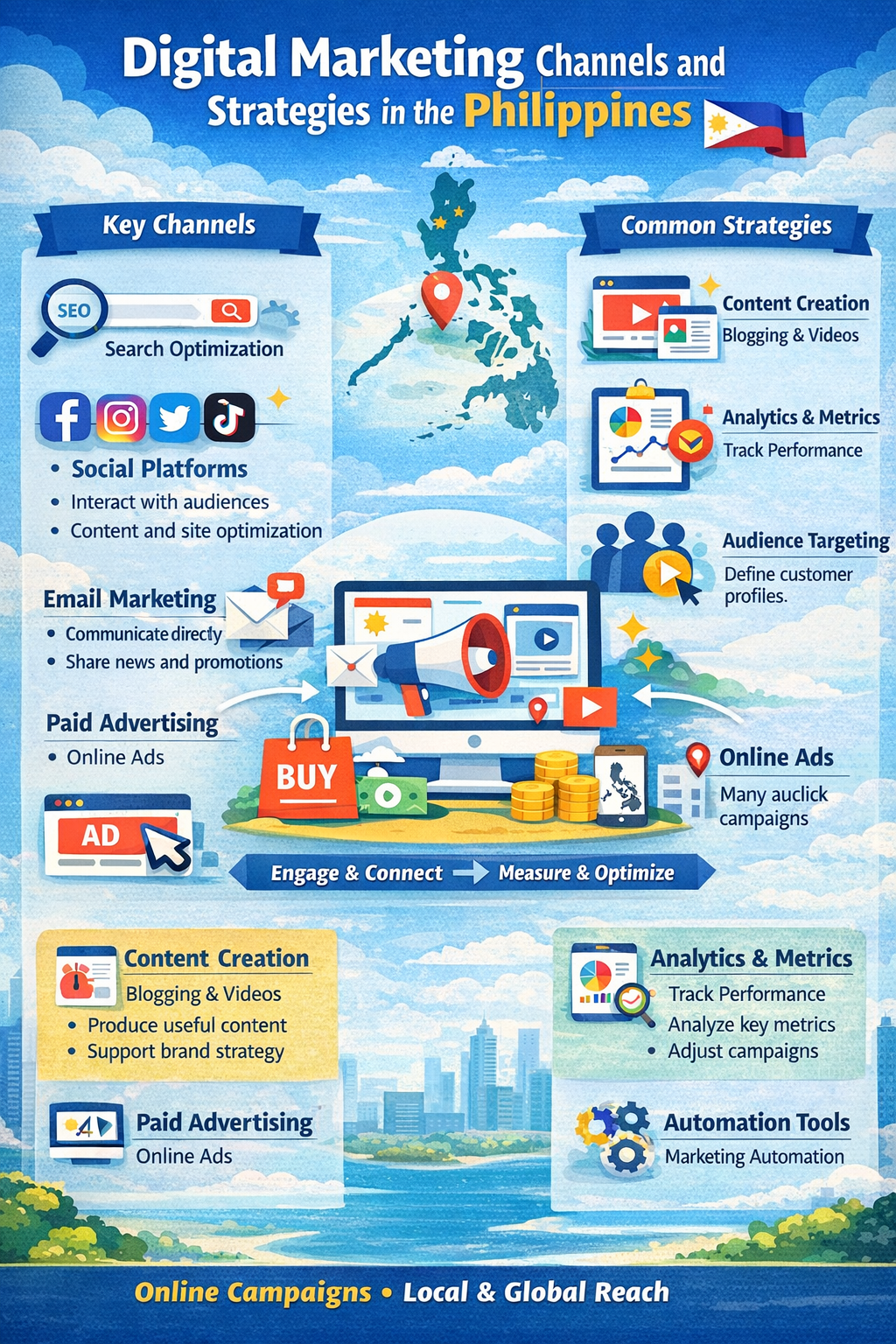
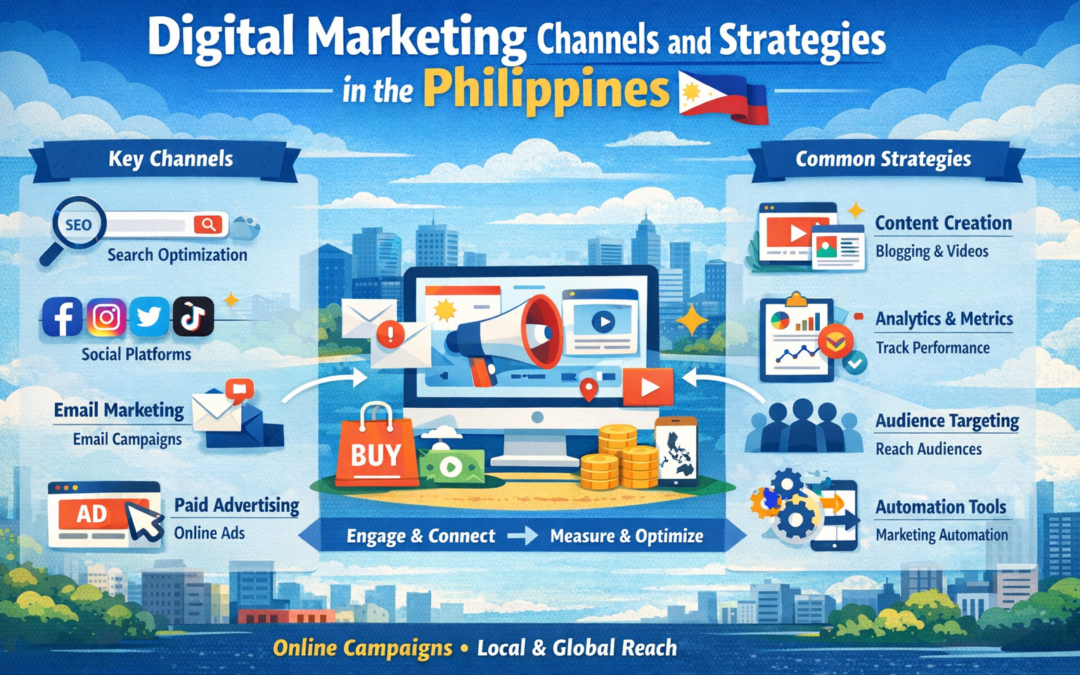
Illustrated infographic showing common digital marketing channels and workflows
Key Channels of Digital Marketing
Search Engine Optimization (SEO)
SEO involves optimizing a website or online content so that it can be discovered more easily via search engines. Techniques include keyword research, content creation, technical optimization, and link-building strategies. Results depend on consistent effort and platform updates.
Social Media Marketing
This channel uses platforms like Facebook, Instagram, TikTok, LinkedIn, and Twitter to engage audiences, share content, and promote products or services. Social media campaigns vary by region and platform rules, and performance depends on audience targeting and content quality.
Email Marketing
Email marketing is the process of sending targeted messages to subscribers. It is often used for newsletters, promotional campaigns, and customer engagement. Compliance with privacy laws and consent regulations is critical when using email marketing.
Paid Advertising (PPC)
Pay-per-click advertising allows businesses to display ads on search engines, social media, or other digital platforms. Advertisers only pay when a user clicks an ad. Campaigns must follow platform policies and local advertising regulations.
Content Marketing
Content marketing focuses on creating educational, entertaining, or informative content to attract and retain audiences. Blogs, videos, infographics, and podcasts are commonly used to provide value and support other marketing channels.
Benefits of Digital Marketing
Digital marketing offers measurable, cost-effective ways to reach specific audiences. It allows businesses to track engagement, adjust campaigns in real time, and scale marketing efforts globally or locally depending on goals.
Common Digital Marketing Strategies
-
Creating high-quality, search-optimized content
-
Engaging audiences on social media platforms
-
Running paid campaigns with clear targeting
-
Using email sequences to nurture leads
-
Analyzing data to inform strategy and improve performance
Measuring Digital Marketing Success
Success is typically measured using analytics tools to monitor key metrics like website traffic, conversion rates, social engagement, and return on ad spend. Metrics vary depending on objectives and platforms used.
Practical Checklist for Getting Started
-
Define target audience and marketing objectives
-
Choose appropriate digital channels for your business
-
Develop a content calendar and campaign plan
-
Track metrics using analytics tools
-
Adjust strategies based on performance insights
FAQ
1. Is digital marketing only for large companies?
No. Many small businesses use digital marketing to reach local and global audiences cost-effectively.
2. How long does it take to see results in digital marketing?
Results vary by channel, strategy, and execution. SEO often takes several months, while paid ads may show more immediate engagement.
3. Do I need technical skills for digital marketing?
Basic knowledge of platforms, analytics, and content creation is helpful, but many tools simplify management for beginners.
Overview Summary
Digital marketing is the practice of promoting products or services using online channels, including SEO, social media, email, and paid ads. It focuses on audience engagement, measurable results, and content creation. Effectiveness depends on strategy, platform policies, and audience context.
Trusted Sources / Standards
-
Google Search Central: SEO and digital marketing guidelines
-
Meta Business Help Center: Social media marketing best practices
-
TikTok Business Help Center: Platform-safe advertising
-
FTC Consumer Guidance: Advertising transparency
-
Philippine Consumer Act (RA 7394) and Data Privacy Act (RA 10173)
Disclaimer
“This content is provided for general educational purposes only. Digital marketing results vary depending on market conditions, platform rules, audience behavior, and execution.
by iamrolanddiaz | Sep 12, 2025 | Healthcare SEO, Pharmaceuticals, Principeng Hari
1. Introduction & Scope
In 2026, search engine optimization (SEO) has become a critical tool for healthcare and pharmaceutical organizations seeking visibility online. Unlike traditional SEO, healthcare SEO operates under stringent YMYL (Your Money or Your Life) guidelines, meaning that content must be accurate, evidence-based, and legally compliant.
Healthcare patients, caregivers, and professionals increasingly rely on search engines to find safe, reliable, and up-to-date medical information. For pharmaceutical companies, clinics, and health startups, a strong SEO strategy is essential not only for visibility but also to build trust, maintain compliance, and avoid legal penalties.
With AI-driven search results, semantic indexing, and voice search adoption in 2026, healthcare organizations must optimize both technical and content aspects of their websites. From structured data implementation to authoritative citations, SEO in healthcare demands meticulous planning and adherence to ethical standards.
Link to Healthcare SEO Hub
Next Funnel Link: Awareness → Consideration
2. Key Facts Summary
Healthcare and pharmaceutical searches have skyrocketed over the last five years, with Google reporting over 70% of health-related queries now conducted via mobile devices. AI-powered search algorithms, including BERT and MUM, prioritize authoritative, reliable, and locally relevant content, making E-E-A-T signals more important than ever.
YMYL content, which includes drug information, treatment guidance, and health advice, requires strict adherence to regulatory frameworks such as HIPAA, GDPR, FDA regulations, and Australia’s TGA standards. Failure to comply can result in penalties, delisting from search engines, or legal action.
In 2026, best practice healthcare SEO integrates:
-
Structured data and schema markup for medical content
-
Expert-reviewed and evidence-based content
-
Geo-targeted optimization for local healthcare providers
-
AI-friendly content formats such as FAQs and conversational queries
Download Quick Stats Sheet
Next Funnel Link: Awareness
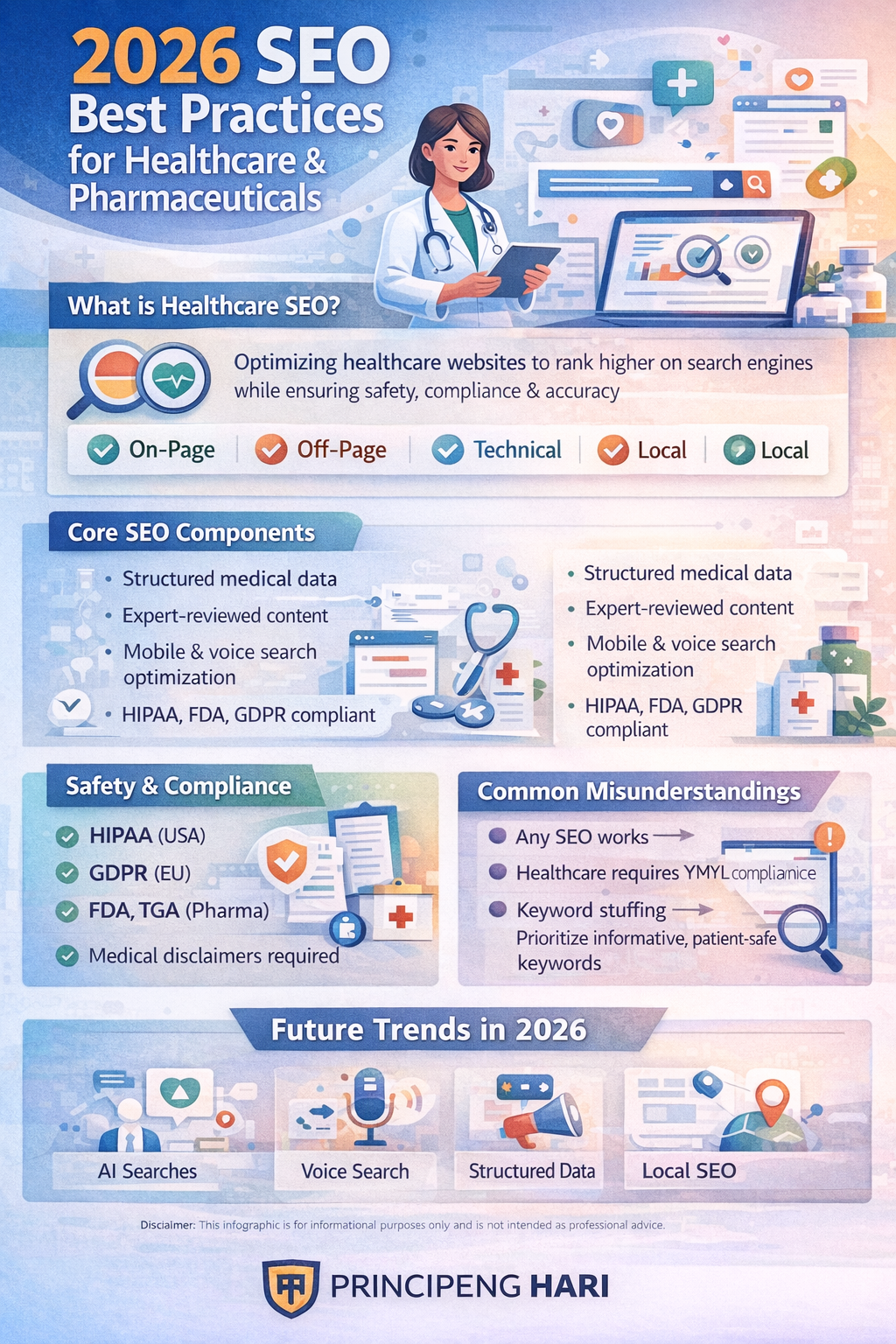
Key steps to optimize healthcare and pharmaceutical websites safely in 2026
3. What Is Healthcare SEO?
Healthcare SEO refers to search engine optimization specifically designed for the healthcare and pharmaceutical industries. Unlike general SEO, healthcare SEO must balance visibility with accuracy, compliance, and patient safety.
Key elements include:
-
On-page optimization: Meta tags, headings, keyword placement, and readability
-
Technical SEO: Fast loading pages, mobile-first design, secure HTTPS, and structured data
-
Off-page SEO: Backlinks from reputable medical sources and institutions
-
Local SEO: Optimizing for clinics, hospitals, and pharmacy locations
Healthcare SEO ensures that patients and professionals can find trusted information easily, while companies remain compliant with YMYL rules. This specialized SEO strategy is essential in 2026 due to increased regulatory scrutiny and AI-driven search results.
Link to Introductory Guide
Next Funnel Link: Awareness
4. Who This Information Applies To
This guide is essential for:
-
Digital marketers in healthcare and pharma
-
Pharmaceutical companies managing product information online
-
Hospital administrators and clinic managers seeking to attract patients safely
-
Health startups building digital presence for telehealth services
The information ensures that professionals can optimize their websites effectively while adhering to regulatory standards and maintaining trustworthiness. By implementing these best practices, organizations can increase visibility, protect patients, and enhance credibility.
Join Newsletter for Updates
Next Funnel Link: Awareness
5. How SEO Works in Pharmaceuticals
SEO in pharmaceuticals involves a multi-layered approach to content, technical architecture, and compliance. It includes:
-
Content Strategy: Writing evidence-based articles, FAQs, and guides reviewed by certified experts.
-
Technical SEO: Fast load times, secure connections, structured data for drugs and treatments.
-
Authority Signals: Citations from peer-reviewed journals, trusted health institutions, and official medical organizations.
-
AI Optimization: Using conversational queries and semantic search-friendly content.
In pharmaceuticals, accuracy is paramount. A poorly optimized website risks misinforming patients, harming brand trust, and violating regulations. 2026 SEO requires both digital marketing expertise and medical domain knowledge.
Link to Technical SEO Checklist
Next Funnel Link: Awareness
6. Core Components / Types
Healthcare and pharmaceutical SEO relies on several core components:
1. On-Page SEO: Clear headings, meta descriptions, alt text, and structured content optimized for readability and compliance.
2. Off-Page SEO: Backlinks from verified medical sources, scientific journals, or government health agencies.
3. Local SEO: Google Business Profiles for clinics, pharmacies, and hospitals; geo-targeted content.
4. Technical SEO: Fast mobile-friendly pages, HTTPS security, sitemap submission, structured data (Schema.org MedicalEntity, Drug, FAQPage).
These elements ensure visibility, compliance, and trust while meeting modern search engine requirements.
Link to Core SEO Toolkit
Next Funnel Link: Awareness
7. Benefits, Limitations & Risks
Benefits:
-
Higher visibility for patients and professionals
-
Enhanced trust and credibility
-
Increased patient acquisition and engagement
Limitations:
-
Slow adoption due to compliance constraints
-
Complexity of managing YMYL content
-
High competition in pharma and healthcare niches
Risks:
-
Penalties for misinformation or non-compliance
-
Reduced rankings if E-E-A-T standards are not met
-
Potential legal liabilities under HIPAA, GDPR, or TGA regulations
A thoughtful approach balances visibility, compliance, and patient safety while minimizing exposure to risk.
Link to Risk Mitigation Guide
Next Funnel Link: Awareness
8. Safety, Compliance & Regulations
Healthcare SEO is governed by:
-
HIPAA (US): Protects patient privacy and data security
-
GDPR (EU): Governs user data processing and consent
-
FDA (US): Regulates online pharmaceutical claims
-
TGA (Australia): Ensures drug information accuracy
-
Local medical boards globally
Content must include:
Compliant websites build trust, avoid penalties, and ensure patient safety.
Link to Compliance Resource
Next Funnel Link: Awareness
9. Common Misunderstandings
-
“Any SEO strategy works in healthcare” → FALSE, requires compliance
-
“Keyword stuffing is safe” → FALSE, harms rankings and credibility
-
“AI-generated content replaces expert review” → FALSE, human verification is mandatory
Understanding these pitfalls prevents legal issues and maintains authority.
Link to Common Mistakes Guide
Next Funnel Link: Awareness
10. Evidence, Standards & Sources
Use peer-reviewed and official sources:
-
World Health Organization (WHO)
-
U.S. Food & Drug Administration (FDA)
-
Therapeutic Goods Administration (TGA, Australia)
-
PubMed and medical journals
-
Google’s Search Quality Evaluator Guidelines
Evidence-based SEO ensures compliance, trust, and effectiveness.
Access Curated Source Library
Next Funnel Link: Awareness
11. Future Developments in 2026
Key trends:
-
AI-driven SEO: Semantic search, conversational queries
-
Voice search optimization for patients seeking urgent info
-
Enhanced structured data for medical FAQs, treatments, and drug information
-
Geo-targeted and hyper-local content for clinics and pharmacies
Healthcare organizations must adapt quickly to emerging technologies while maintaining regulatory compliance.
Sign Up for Future Trends Webinar
Next Funnel Link: Awareness
12. Frequently Asked Questions
Q1: How do I optimize medical content safely?
A: Always use certified experts, cite authoritative sources, and include disclaimers.
Q2: Which schema types are mandatory?
A: MedicalEntity, Drug, FAQPage, Article, and Organization for health providers.
Q3: How can I rank locally for my pharmacy?
A: Optimize Google Business Profile, include local schema, and geo-targeted content.
Visit FAQ Hub
Next Funnel Link: Awareness
13. Final Considerations & Next Steps
To succeed in 2026, healthcare and pharmaceutical organizations must:
-
Prioritize accuracy and compliance
-
Implement structured data and E-E-A-T signals
-
Optimize for mobile and AI-driven search
-
Maintain regular expert review
By following these guidelines, organizations can move from Awareness to Consideration, building both visibility and trust.
Link to Consideration Stage Guide
Next Funnel Link: Consideration
by iamrolanddiaz | Sep 12, 2025 | Artificial Intelligence, Personal Tech, SEO / Digital Optimization, Web Performance
Table of Contents
- Introduction & Scope
- Key Facts Summary
- What Is AEO?
- Who This Information Applies To
- How AEO Works in 2026
- Core Components / Types
- Benefits, Limitations & Risks
- Safety, Compliance & Standards
- Common Misunderstandings
- Evidence, Standards & Sources
- Future Developments in 2026
- Frequently Asked Questions
- Final Considerations & Next Steps
- Final CTA
Section Content Guidelines
1. Introduction & Scope
AEO (Automated Experience Optimization) is transforming digital marketing in 2026 by personalizing user experiences through AI, analytics, and automation. Modern AEO combines UX, CRO, and SEO signals to improve engagement, conversions, and search visibility.
In an era where search engines reward user satisfaction, speed, and interactivity, AEO is essential for businesses seeking to outperform competitors. By leveraging AI-driven personalization, web performance monitoring, and behavioral insights, companies can deliver highly optimized, frictionless experiences.
Link to AEO Hub
Next Funnel Link: Awareness → Consideration
2. Key Facts Summary
-
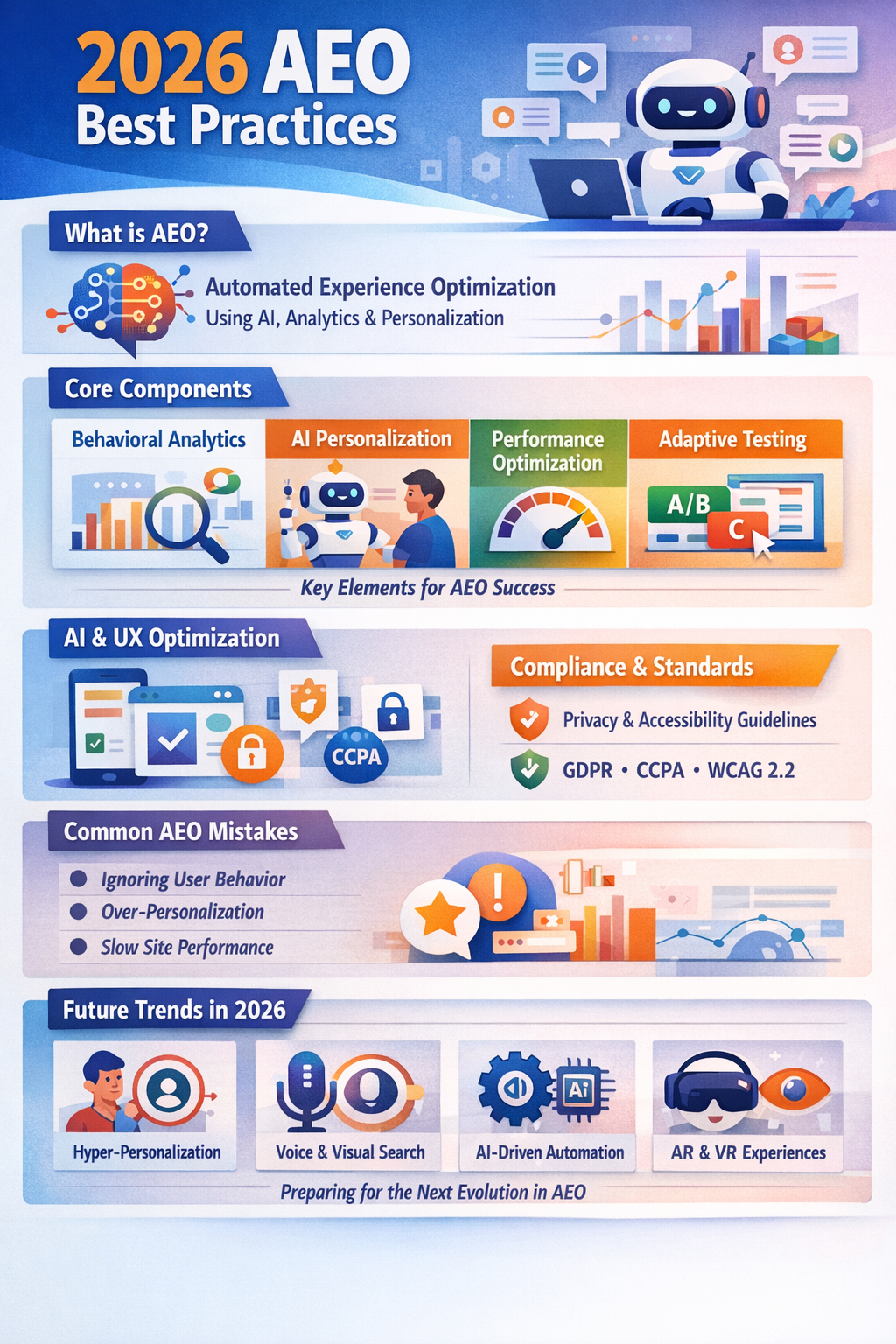
2026 AEO trends highlight AI-driven personalization, multi-device experience optimization, and data-driven testing.
-
Sites optimized for Core Web Vitals, interactive content, and accessibility outperform competitors in search rankings.
-
Businesses implementing structured AEO frameworks report up to 30% higher engagement and conversion rates.
Download Quick Stats Sheet
Next Funnel Link: Awareness
3. What Is AEO?
AEO (Automated Experience Optimization) is the practice of using AI, machine learning, and analytics to continuously improve website and app experiences. Unlike standard CRO, AEO focuses on real-time behavioral adaptation, testing multiple variations, and integrating SEO and UX data for optimal performance.
Introductory Guide to AEO
Next Funnel Link: Awareness
Key steps to implement effective AEO in 2026
4. Who This Information Applies To
AEO is relevant for:
Join Newsletter for Updates
Next Funnel Link: Awareness
5. How AEO Works in 2026
Key mechanisms:
-
Behavioral Analytics: Track user interactions to predict optimal pathways
-
AI Personalization: Dynamically adjust content, layout, and recommendations
-
Performance Monitoring: Optimize speed, Core Web Vitals, and responsiveness
-
Automated Testing: Run A/B or multivariate experiments automatically
Link to Technical Checklist
Next Funnel Link: Awareness
6. Core Components / Types
-
On-page Experience Optimization: Adaptive content, headings, microcopy
-
Technical AEO: Fast loading, accessibility, responsive design
-
AI & Predictive Analytics: Personalization, segmentation, and recommendations
-
Integration with SEO: Structured data, semantic optimization, and search visibility
Link to Core AEO Toolkit
Next Funnel Link: Awareness
7. Benefits, Limitations & Risks
Benefits:
-
Increased engagement and conversions
-
Improved user satisfaction and retention
-
Enhanced search engine visibility
Limitations:
Risks:
Link to Risk Mitigation Guide
Next Funnel Link: Awareness
8. Safety, Compliance & Standards
While AEO is generally low-risk for YMYL, organizations must:
-
Follow data privacy regulations (GDPR, CCPA)
-
Ensure accessibility standards (WCAG 2.2)
-
Avoid manipulative personalization that can mislead users
Link to Compliance Resource
Next Funnel Link: Awareness
9. Common Misunderstandings
-
“AEO is only for eCommerce” → FALSE, applies to all digital experiences
-
“AI replaces human optimization” → FALSE, requires monitoring and review
-
“Faster always equals better” → FALSE, UX quality and personalization matter
Link to Common Mistakes Guide
Next Funnel Link: Awareness
10. Evidence, Standards & Sources
-
Google Web Vitals & Search Central Guidelines
-
Nielsen Norman Group UX Studies
-
W3C Accessibility Standards
-
Case studies from top AI-driven marketing platforms
Access Curated Source Library
Next Funnel Link: Awareness
11. Future Developments in 2026
-
Hyper-personalization across devices and channels
-
Integration of AI, ML, and analytics for real-time optimization
-
Voice search and AR/VR experiences
-
Automated A/B and multivariate testing across segments
Sign Up for Future Trends Webinar
Next Funnel Link: Awareness
12. Frequently Asked Questions
Q1: How do I start implementing AEO?
A: Begin with behavioral analytics, set KPIs, and adopt AI-powered testing tools.
Q2: Does AEO replace CRO?
A: No, it enhances CRO with automation and real-time data adaptation.
Q3: Is AEO compliant with privacy regulations?
A: Yes, if data collection is transparent and consented.
Visit FAQ Hub
Next Funnel Link: Awareness
13. Final Considerations & Next Steps
AEO is critical for digital competitiveness in 2026. Companies must:
-
Adopt AI-driven personalization
-
Optimize Core Web Vitals and responsiveness
-
Follow privacy and accessibility standards
-
Integrate SEO with experience optimization
Link to Consideration Stage Guide
Next Funnel Link: Consideration
by iamrolanddiaz | Sep 12, 2025 | GEO, Smart Home
GEO Best Practices for 2026 – Principeng Hari
Introduction & Scope
Geo-targeting is increasingly critical in 2026, as search engines refine algorithms to prioritize location-specific relevance. Businesses and content creators must adapt to ensure they reach their intended audience in the right geography. This guide explores practical strategies for optimizing GEO signals, enhancing local search visibility, and improving user experience across regions.
By understanding the latest GEO SEO best practices, marketers can:
-
Align content with searcher intent per location
-
Improve SERP rankings in targeted regions
-
Reduce wasted traffic and increase conversion rates
CTA Placeholder: [Explore Local SEO Tools]
Next Funnel Link: Awareness → Consideration
Key Facts Summary
-
Local search accounts for over 55% of mobile searches globally.
-
Search engines now weigh hyper-local relevance more heavily.
-
GEO signals include IP, SERP localization, language, structured data, and business listings.
-
2026 emphasizes user intent + location context in search results.
Proper implementation of GEO best practices increases local engagement and drives measurable conversions.
Check Your Geo SEO Score
Next Funnel Link: Awareness
What Is GEO SEO?
GEO SEO, or geographic search engine optimization, is the process of optimizing content and web assets to perform well for users in specific locations. It ensures that businesses appear in relevant searches for their target regions.
Key components include:
-
Localized content and landing pages
-
Structured data like LocalBusiness schema
-
Google Business Profile optimization
-
Consistent NAP (Name, Address, Phone) across directories
Learn How GEO SEO Works
Next Funnel Link: Awareness → Consideration
Who This Information Applies To
This guide is essential for:
-
Businesses targeting regional markets
-
Digital marketers managing multi-location campaigns
-
E-commerce stores with location-specific shipping
-
SEO professionals aiming to enhance local SERP performance
Even global brands can benefit by segmenting content for high-value regions.
\Evaluate Your Market Locations
Next Funnel Link: Awareness
How GEO Best Practices Work
Effective GEO SEO combines multiple signals to communicate location relevance to search engines:
- On-Page Signals: Location-specific keywords, title tags, headers
- Off-Page Signals: Local backlinks, citations, reviews
- Technical Signals: hreflang tags for multilingual content, geo-targeted sitemaps
- Behavioral Signals: CTR, dwell time, user interactions from specific regions
These strategies ensure your content aligns with both local search intent and global optimization standards.
Audit Your GEO Signals
Next Funnel Link: Consideration → Conversion
Core Components / Types
-
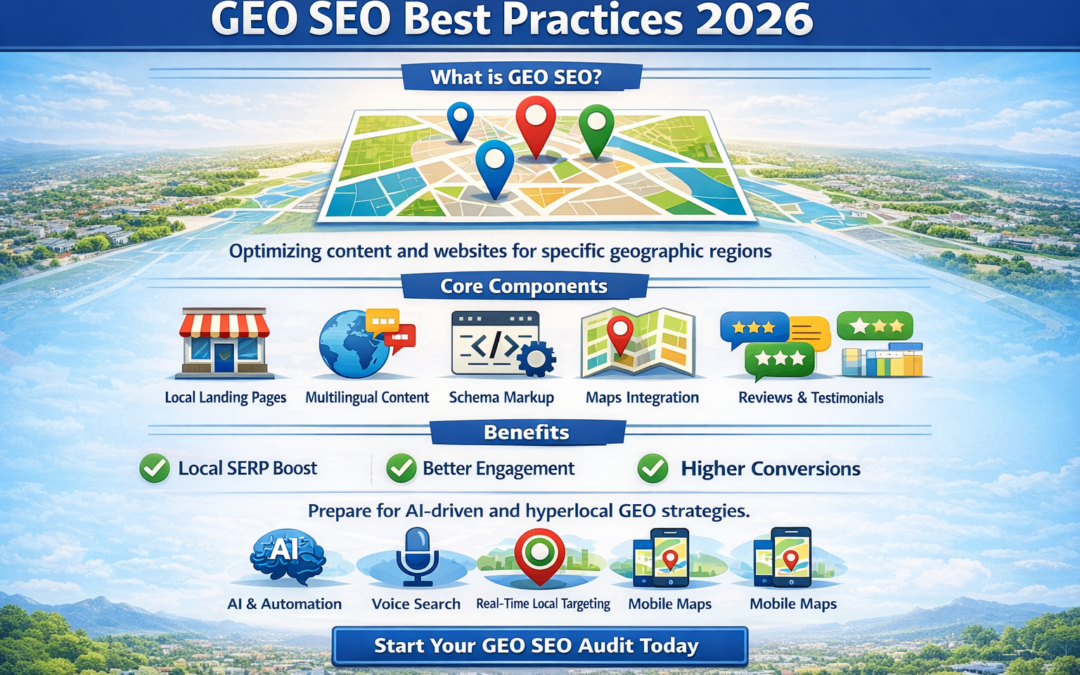
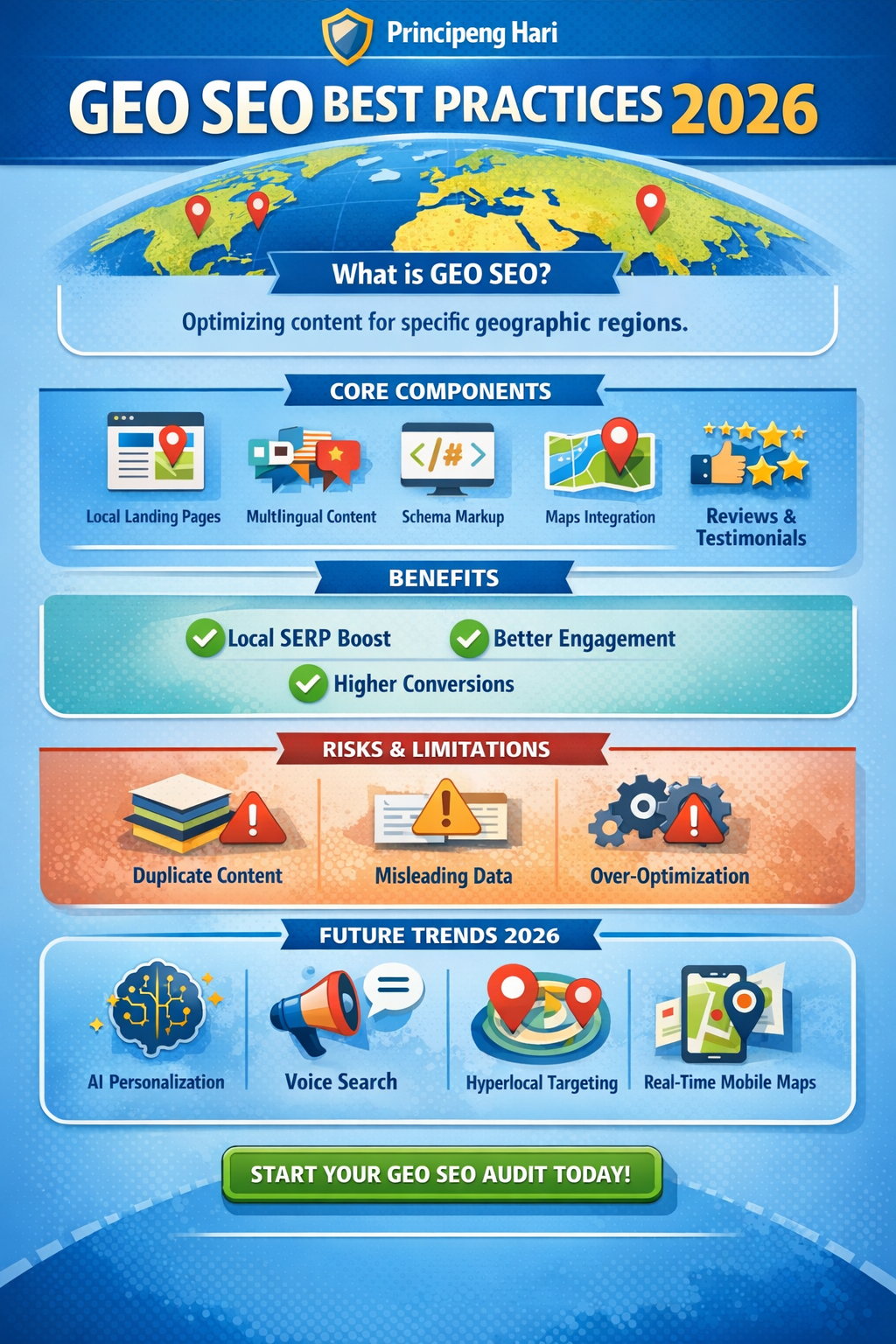
Local Landing Pages: Unique pages per city, region, or country
-
Multilingual Content: Translated and culturally adapted content
-
Schema Markup: LocalBusiness, Organization, and GeoCoordinates structured data
-
Maps Integration: Embedding Google Maps and location widgets
-
Reviews & Testimonials: Region-specific social proof
Download GEO Optimization Checklist
Next Funnel Link: Consideration → Conversion
Benefits, Limitations & Risks
Benefits:
-
Higher local SERP rankings
-
Better user engagement and conversions
-
Improved mobile visibility
Limitations:
Risks:
Assess Your GEO Risks
Next Funnel Link: Consideration
Safety, Compliance & Regulations
Ensure your geo-targeted content complies with local regulations:
-
Privacy laws (e.g., GDPR, CCPA) for collecting location data
-
Accurate representation of addresses and services
-
No misleading claims or false localization
Following guidelines protects your brand and avoids search penalties.
Review Regional Compliance Checklist
Next Funnel Link: Consideration
Common Misunderstandings
-
Misconception: One landing page can serve all locations
Reality: Search engines favor unique pages per region
-
Misconception: GEO SEO is only for local small businesses
Reality: Global enterprises benefit from regional targeting
-
Misconception: Backlinks are optional
Reality: Local citations and reviews impact ranking significantly
Debunk GEO SEO Myths
Next Funnel Link: Awareness → Consideration
Evidence, Standards & Sources
-
Google Search Central: Local SEO guide 2026
-
MOZ: Geo-Targeting Best Practices
-
Ahrefs: Local SERP Analysis Report
-
Search Engine Journal: Multilingual & Multi-Region SEO
Explore Full GEO Resources
Next Funnel Link: Awareness
Future Developments
In 2026 and beyond, GEO SEO is expected to evolve with:
-
AI-driven local search personalization
-
Enhanced map integration in search results
-
Voice search with geo-contextual results
-
Real-time hyperlocal targeting for mobile users
Stay Ahead with GEO Trends
Next Funnel Link: Awareness → Consideration
Frequently Asked Questions
Q1: Do I need separate pages for every city?
A: Yes, for highly competitive regions, unique pages improve ranking.
Q2: Can GEO SEO work for e-commerce?
A: Absolutely, with localized landing pages and shipping info.
Q3: How do I track GEO performance?
A: Use Google Analytics, Search Console location reports, and local SERP tracking tools.
See Full FAQ on GEO SEO
Next Funnel Link: Consideration
Final Considerations & Next Steps
Effective GEO SEO requires strategic planning, consistent updates, and compliance with both local regulations and global SEO standards. Implementing these best practices in 2026 ensures businesses can capture highly relevant traffic and maximize local engagement.
Start Your GEO SEO Audit Today
Next Funnel Link: Conversion